When I try to open folders (and the trash can) by double-clicking on them on the desktop nothing happens. However, when I right-click on the folder, select "Open with another application", and then select Nautilus it opens normally. I think that it has something to do with the default file manager maybe? (I can open other files that aren't folders normally)
Asked
Active
Viewed 4.3k times

11 Answers
6
My system is Ubuntu 17.10.
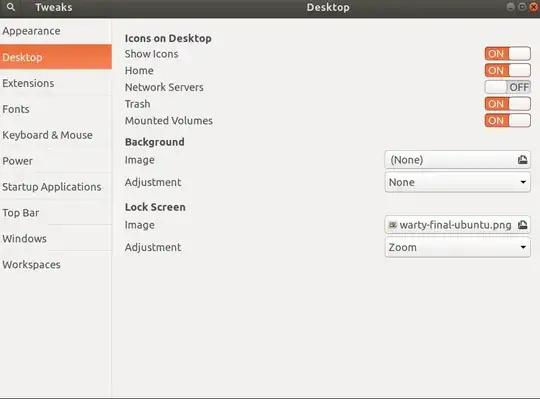
I just had this problem 5 mins ago. Here is my solution.
Just install gnome-tweak
sudo apt install gnome-tweak-tool
Then turn off and turn on some of the options in the Desktop. Like show icons turn on and turn off. Then it seems like things are refreshed and everything works again!

pLumo
- 27,991

4
Reinstalling nautilus did not resolve the issue. I tried many other things like resetting dconf and reinstalling gnome-tweak-tool etc but nothing helped. In my case, the issue was due to FileManager dbus service residue from another desktop which I assume might be interfering with the default desktop.
Steps to fix this issue:
# 1. Look for the residue:
cd /usr/share/dbus-1/services
ls | grep File

# 2. you will get something like:
org.freedesktop.FileManager1.service
org.gnome.FileRoller.ArchiveManager1.service
org.gnome.FileRoller.service
org.mate.freedesktop.FileManager1.service

# 3. delete the unused file manager service
sudo rm -f org.mate.freedesktop.FileManager1.service
To know whether you have the same issue you can:
1. terminate nautilus-desktop run it again in the terminal. (this way you can see logs from the nautilus service)
2. Try to open any folder present on your desktop and look for the error
: cannot open folder on desktop, freedesktop bus not ready
3. If you see this its exactly the same issue and can be resolved by the above mentioned steps to fix.
Issue: error: cannot open folder on desktop, freedesktop bus not ready
Source: https://gitlab.gnome.org/GNOME/nautilus/issues/872

Aashutosh Taikar
- 51
- 3
3
The best solution which worked for me was to use the following terminal commands:
sudo apt-get purge   nautilus
sudo apt-get install nautilus
nautilus --check

David
- 3,487

Mahmoud Sakr
- 31

2
This was driving me mad but I found adjusting the touchpad/mouse settings solved the issue...
Click "Activities" in the top left corner, search "settings", then click on "devices".
Try adjusting Behavior - Drag and Drop, Double Click and Distance. I just moved them all to maximum settings and bingo I could double click the folders to open!!

Gordster
- 1,700

1
The problem is an old xfce installation or the package "exo-utils". Remove "exo-utils". This is an well known and older problem:
Code:
sudo apt-get remove --purge exo-utils
And everything worked as expected.

don_vanchos
- 151
1
I know that this isn't a direct solution to the problem (that I was having too), but my choice was to install another File manager altogether. I chose Nemo. This is how you integrate Nemo in Ubuntu taking the place of Nautilus (the culprit here).
- First of all you install Nemo as explained here: INSTALL NEMO
- Then you set Nemo as your default File Manager as shown here: DEFAULT NEMO
Then, if you want to have Nemo display the standard icons on the Desktop like Home, Computer, Network, Recicle Bin, etc..., you need to enable some settings. I am quite sure you can do it in the Terminal but I chose to install the GUI "dconf-tools"
sudo apt-get install dconf-toolsand then launch the GUI by issuing
dconf-editorThe settings that you need to change are located in "/org/nemo/desktop". They are pretty self-explicative.
I hope that this have been useful to you.

LastStarDust
- 61
- 2
- 8
0
You can update your default application for opening folders to nautilus by running the following command.
xdg-mime default nautilus.desktop inode/directory application/x-gnome-saved-search

Simon
- 101
0
Maybe another file manager is in conflict with nautilus? In my case it was Caja.
sudo apt-get purge caja

0
The following commands worked for me on Ubuntu 18.04:
sudo apt-get purge nautilus
sudo apt-get install nautilus
nautilus --check

Kevin Bowen
- 20,055
- 57
- 82
- 84


0
For anyone still facing this issue, I came across it in a rather stupid way. There are chances you might have done this too. Go to your mouse settings and ensure the double click time is not at the minimum. checkout my settings here


Kk mehta
- 1