1

I just want to get some advices howto save energy on my new laptop. I already installed a kernel patch.

On the picture below you can see, that i got less minutes of time than percentage. Only Wireless Lan and Firefox was running, and the display was on the lowest level I'm able to switch to.
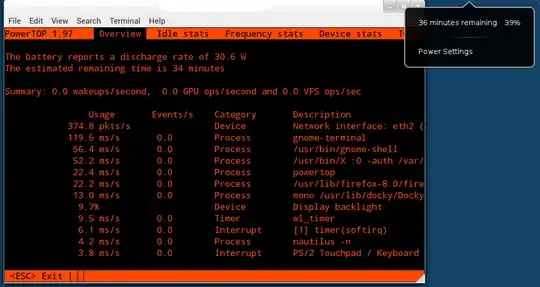
enter image description here

I have installed no graphic driver, because the system would break after it.

If I'm using Windows I got about 2-3 hours or more to browsing the web, or reading something.

Some Data:

  • Model:Acer Aspire 5750G
  • System: Ubuntu 11.10 Oneric Ocelot x64
  • Kernel: 3.0.0-13.22 mjgaspmfix
  • DE: Gnome 3
  • CPU: Intel i7 2630QM (Sandy Bridge)
  • GPU: Nvidia Geforce GT 540M (Optimus)
Jorge Castro
  • 73,717

3 Answers3

2

Here is your nvidia dirver link : http://www.nvidia.com/object/linux-display-amd64-290.10-driver.html

Install jupiter which is a indicator-applet. You can select your processor frequency [powersaver, performance, on demand) using jupiter.

Check the original backup time (not from applet). If backup time is ok then don't worry about notified time limit.

Most of the time graphics is the issue for more power consumption. So fix it first.

You have to install nvidia driver from command line.

CLT+ALT+F1

Login

sudo /etc/init.d/lightdm stop
sudo ./nvidi....
sudo /etc/init.d/lightdm start
shantanu
  • 8,835
0

Looking at powertop, I would guess that xfce uses less processor (and therefore less power) than Gnome Shell and Docky.

A better answer is probably to figure out CPU scaling. Web browsing shouldn't use a lot of your i7's power, so that should provide some improvements. Here's more about jupiter.

There's also powernap (which I've never used).

There may be some answers in this thread.

idbrii
  • 3,162
0

Your specific problem is probably the NVidia card drawing power, since you don't have any proper drivers. Installing those messes with Optimus, so that's out two. If you're open to slightly instable solutions, I can recommend Ironhide, available from this ppa: https://launchpad.net/~mj-casalogic/+archive/ironhide/ Note that the developer seems inactive, so don't expect any support. Ironhide is a solution that hacks hybrid graphics support through launching extra xorg sessions. In addition, it has a database with powersaving configurations. (I have a working configuration for the Asus K53SV, which has a GT540M, so chances are there's one for yours too.) Alternatively, there's Bumblebee, which is more stable but does not attempt to help you in powersaving, which is what your aim is. ( https://github.com/Bumblebee-Project/Bumblebee )

aureianimus
  • 3,586