11

How can I put the opened programs in the top bar to switch between them? Like Xubuntu, KDE, Gnome classic, fallback... But I'm talking about Unity.

I need see/know what software I'm using in some moment without need to use the large side bar of Unity.

I'm left-hand and I can't use + all the time.

I need alternate between the programs using the top bar without a bar that group the same programas (as the Unity sidebar do it).

I can't believe Canonical didn't think about the big free space in the top bar (just have the clock, system tray and some icons).

I installed MyUnity but I can't change anything about top bar.

I know the top bar is the app menu.

I just want the opened programs without use the sidebar. The sidebar group the same window. Where can I mark to never group? MyUnity and CompizConfig Setting Manager don't have this option.

Jorge Castro
  • 73,717

2 Answers2

7

The top panel isn't empty. It is used for applications menus and titlebars, and you can add many indicators which also requires space. I sometimes like to use my screens narrow and tall, and then there would really not be any room for anything more.

You can't add a taskbar to the top panel. Adding a bottom panel with a taskbar is fairly easy, though. You can use Gnome Panel (the panels from earlier versions of Ubuntu -- they are still available), Xfces panel, LXDEs panel or any other panel you like. There will be no conflict with Unity as long as you only use a bottom panel. In the case of Gnome Panel, you'd have to delete the top panel manually, either by pressing alt and right-clicking the top panel, or you could use dconf-editor from the dconf-tools package.

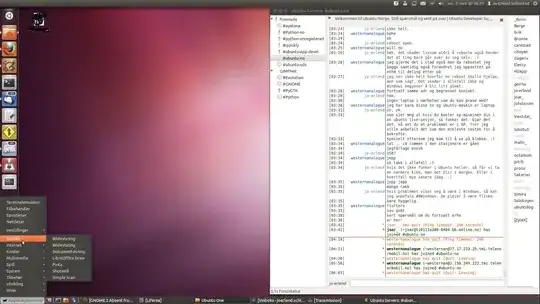
For instance, this is Unity with an xfce4-panel taskbar, with extras. As you can see, there's no conflict. I would probably recommend that you use Gnome Panel if that's what you're used to. Just remember that in Gnome Panel 3, you have to press alt to display the right-click menu on the panel or move applets. Otherwise, it's just the same as in earlier versions.

enter image description here

0

By default you can't customize top panel. However there are workarounds. But I advise you not to play with your top panel, as it will only create additional issues, which might not be easy to fix.

jrg
  • 61,707