Two days ago, I have installed Ubuntu 16.04 and I'm trying to install intellij IDEA ide for java coding, it is saying "no such directory found".
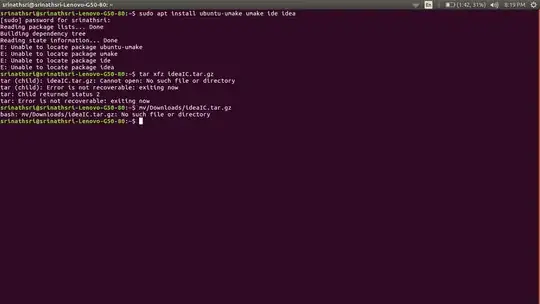
Two days ago, I have installed Ubuntu 16.04 and I'm trying to install intellij IDEA ide for java coding, it is saying "no such directory found".


Here is an easy way to install IntelliJ IDEA Community edition:
sudo apt install ubuntu-make
umake ide idea
To remove IntelliJ IDEA Community edition installed via Ubuntu Make, use this command:
umake -r ide idea

You're welcome, here you go, firstly Install required Oracle JDK for Ubuntu, then please follow the following steps:
i-Download Latest IntelliJ IDEA 2016 for Linux: Here IntelliJ IDEA 2016 tar.gz for Linux.
ii- Either double-Click and Extract IntelliJ Archive into /tmp Or from Shell with a Command-line like: tar xvzf ~/Downloads/idea*.tar.gz -C /tmp/
iii- sudo su
iv- Set up the root superUser as holder: chown -R root:root /tmp/idea*
v-Switch the IntelliJ IDEA contents: mv /tmp/idea* /opt/idea
vi- Making a Symlink into the working Path: ln -s /opt/idea/bin/idea.sh /usr/local/bin/idea.sh
vii- End the SuperUser session: exit
viii- Launch IDEA from terminal: idea.sh
Finally perform Initial Customization, enjoy.
