1

In Ubuntu 10.10 with Simple Compiz I has a configuration to show the desktop, or show all open windows, when the mouse cursor go to an edge. Now, how can I do it with Ubuntu 11.10?

The configuration screen I'm looking for is like the following (got the image from an explanation for Ubuntu 10):
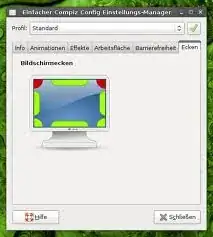
simple-compiz-edges

My CompizConfig screen don't look to have this option also:
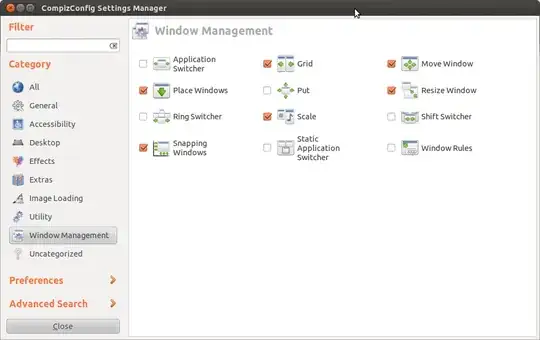
enter image description here

Student
  • 12,236

2 Answers2

1

You have to install compizconfig settings manager.

sudo apt-get install compizconfig-settings-manager

Now, open compiz config settings manager:

alt+F2ccsm

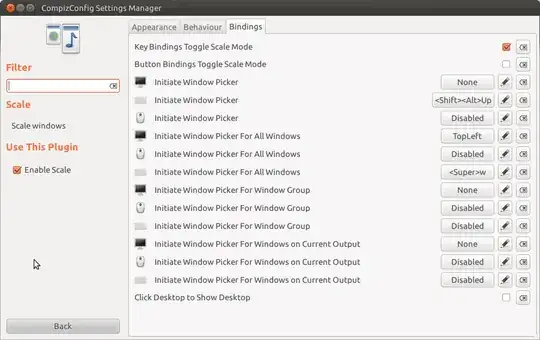
Go to Window Management / Scale.

Here you can enable the window picker for the different edges. Screenshot:

enter image description here

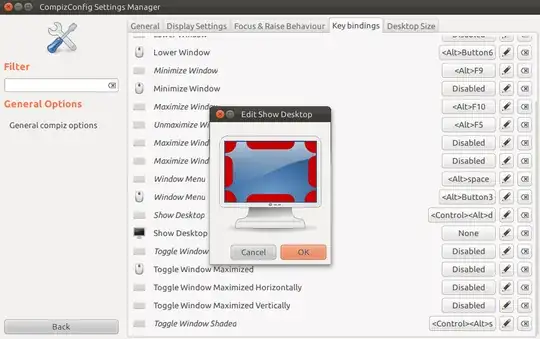
To enable show desktop, go to General Options - Keybindings and enable show desktop with the corner you'd like to use. Screenshot:

enter image description here

martin
  • 1,809
  • 1
  • 13
  • 21
1

Ubuntu tweak << http://ubuntu-tweak.com/ >> also has a section called compiz where you can do that and select other compiz stuff.