4

I am running 64 bit Ubuntu on Dell with 1GB graphic card.

I login with "Ubuntu" hoping to see Unity 3d but it doesn't. Unity 2D runs instead. when I type in

echo "$DESKTOP_SESSION" 

it confirms the Unity-2D.

I've checked the System info that shows like : enter image description here
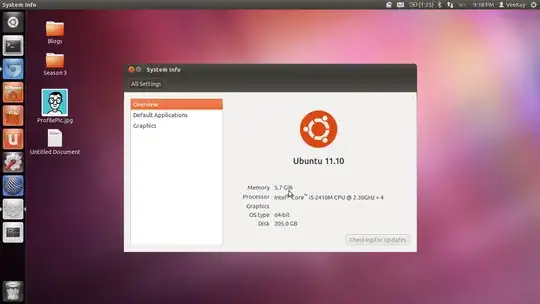
The graphics row shows itself as empty. SO I've presumed that the graphic drivers aren't detected and hence I went to Unity-> Additional Drivers and installed the fglrx driver that the UI has suggested.

Even after installing so, the graphics part in System info details shows nothing and still Unity 2D runs in spite of all the effort.

Please help! How can I get my Unity 3D back?

Hardware Info

Video Card : AMD Radeon™ HD 6470M - 1GB (For ICC)

RAM : 6GB (1 X 2GB + 1 X 4GB) 2 DIMM DDR3 1333Mhz

OS : 64 bit Ubuntu 11.10

Edit : Output for /usr/lib/nux/unity_support_test -p

X Error of failed request:  BadRequest (invalid request code or no such operation)
  Major opcode of failed request:  155 (GLX)
  Minor opcode of failed request:  19 (X_GLXQueryServerString)
  Serial number of failed request:  21
  Current serial number in output stream:  21
Jorge Castro
  • 73,717
Vamsi Emani
  • 2,575

3 Answers3

3

Finally got this resolved myself.

Firstly, I've removed all traces previously installed graphic drivers/fglrx drivers provided by Ubuntu. After doing so, I've re-installed open source graphic drivers instead. Everything is back to normal.

Just in case if anyone else is experiencing the same headache, you can take a look at the below link. I've described in detail, the complete struggle and the steps to resolve it in this blog post.

http://nerdysermons.blogspot.com/2011/11/solve-graphic-driver-errors-unity-3d.html

yefim
  • 3
Vamsi Emani
  • 2,575
1

I have a HP G7 1116sg which is a Germany specific model that has an Intel® Core™ i5-2410M CPU coupled with a Radeon HD6870 integrated graphics card. I have been trying to deal with this unity2d problem for about a year in my off time without any real results.

I thought i'd tried everything, most recently the purging of all things fglrx and trying to use the built in ubuntu drivers as per suggestion here above.

Previously I'd stumbled on to a workaround to the blackscreen I had using Backtrack 5 R2 KDE on the same machine which involed adding a "nomodeset" to my grub.cfg.

Just now I stumbled onto the fix to my "Not software rendered : no" problem to my "/usr/lib/nux/unity_support_test -p" query.

When changed to "modeset=1" in grub.cfg I FINALLY have Unity3d.

This should be added to the GRUB_CMDLINE_LINUX_DEFAULT parameter. You can't make permanent changes to /boot/grub/grub.cfg, so to make this change permanent make the change in /etc/default/grub and run sudo update-grub.

John S Gruber
  • 13,436
0

It is probably 2nd generation laptop. That means you naturally run into dual graphics card hell on Ubuntu. If you have battery and overheat issue see

http://ubuntuforums.org/showthread.php?t=1859945 and

http://ubuntuforums.org/showthread.php?p=11438030 .

As for unity 3d, you can install latest kernel and opensource intel drivers using xorg-edgers ppa. ATI driver freezes if you try to only enable it and play with catalyst. Best option till now is to rely on opensource drivers.

Make sure you have uninstalled all fglrx stuff, remove xorg.conf and then install xserver-xorg-video-intel for your intel hd 3000.

See this on how to uninstall catalyst drivers and install opensource drivers.

http://wiki.cchtml.com/index.php/Ubuntu_Oneiric_Installation_Guide#Removing_Catalyst.2Ffglrx

razor
  • 398