Is there an option to change my default browser for all my applications?
Asked
Active
Viewed 1.9e+01k times


8 Answers
136
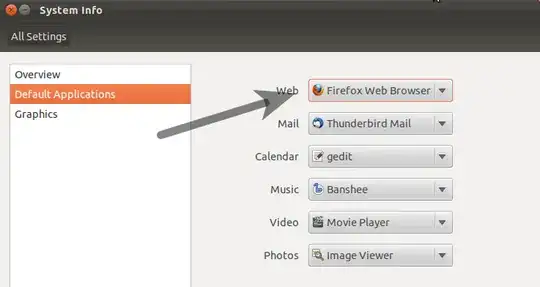
Have a look at your system-settings -> Details:
(Note that in older versions of Ubuntu Details is called System Info)

Jorge Castro
- 73,717

fossfreedom
- 174,526
70
This is an ubuntu way of doing this
sudo update-alternatives --config x-www-browser
sudo update-alternatives --config gnome-www-browser

Sergey P. aka azure
- 1,646
69
If your preferred browser isn't in that menu or you prefer doing it from the command line, this command will let you do the same thing as in fossfreedom's answer:
xdg-settings set default-web-browser name-of-browser.desktop
E.g.:
xdg-settings set default-web-browser firefox.desktop
or
xdg-settings set default-web-browser chromium-browser.desktop
or
xdg-settings set default-web-browser google-chrome.desktop

Cybolic
- 875
20
All preferences about default applications your user located in file "mimeapps.list". I am use Gnome 3 and Debian, so for me it is ~/.config/mimeapps.list.
I you don`t know where is may be located this file, try command:
locate mimeapps.list
For override default a web browser you need, at least, change values in category [Default Applications]
- x-scheme-handler/http
- text/html
- application/xhtml_xml
- image/webp
- x-scheme-handler/https
- x-scheme-handler/ftp
and in category [Added Associations]
- text/html
- text/xml
- application/xhtml_xml
- image/webp
- x-scheme-handler/https
- x-scheme-handler/ftp
For Opera the file ~/.config/mimeapps.list must contains:
[Default Applications]
x-scheme-handler/http=opera-browser.desktop
text/html=opera-browser.desktop
text/xml=opera-browser.desktop
application/xhtml_xml=opera-browser.desktop
image/webp=opera-browser.desktop
x-scheme-handler/https=opera-browser.desktop
x-scheme-handler/ftp=opera-browser.desktop
[Added Associations]
text/html=opera-browser.desktop;
text/xml=opera-browser.desktop;
application/xhtml_xml=opera-browser.desktop;
image/webp=opera-browser.desktop;
x-scheme-handler/https=opera-browser.desktop;
x-scheme-handler/ftp=opera-browser.desktop;
Try it (must be open in Opera, if it installed)
xdg-open somehtmlfile.html
For Chrome the file ~/.config/mimeapps.list must contains:
[Default Applications]
x-scheme-handler/http=google-chrome.desktop
text/html=google-chrome.desktop
text/xml=google-chrome.desktop
application/xhtml_xml=google-chrome.desktop
image/webp=google-chrome.desktop
x-scheme-handler/https=google-chrome.desktop
x-scheme-handler/ftp=google-chrome.desktop
[Added Associations]
text/html=google-chrome.desktop;
text/xml=google-chrome.desktop;
application/xhtml_xml=google-chrome.desktop;
image/webp=google-chrome.desktop;
x-scheme-handler/https=google-chrome.desktop;
x-scheme-handler/ftp=google-chrome.desktop;
Try it (must be open in Chrome, if it installed)
xdg-open somehtmlfile.html
And so on (Firefox, or something else).
You need only override desire mimetypes. But I recommend use GUI for it. It will be reduce amount of errors.
It is actual for me system and will be change from system to system, from desktop environment to desktop environment, and so on.
Testing environment
$ lsb_release -a
No LSB modules are available.
Distributor ID: Debian
Description:    Debian GNU/Linux 8.6 (jessie)
Release:    8.6
Codename:   jessie
$ uname -a
Linux localhost 3.16.0-4-amd64 #1 SMP Debian 3.16.36-1+deb8u2 (2016-10-19) x86_64 GNU/Linux
$s gnome-session --version
gnome-session 3.14.0

sotirov
- 4,379

ВелоКастръ
- 473
2
Apart from some of the comments above, I would suggest following the top answer here. It involves changing the mimeapps/url schemes of your current user.
I had to use that solution to make linux Skype behave normally. Most other applications would use x-www-browser or gnome-www-browser but I guess they do have a point of using the URL Schemes; sometimes it has more sense.


Adrian Castravete
- 121
- 1



0
open brave browser then click top right corner icon then click
Settings.you will see something like:
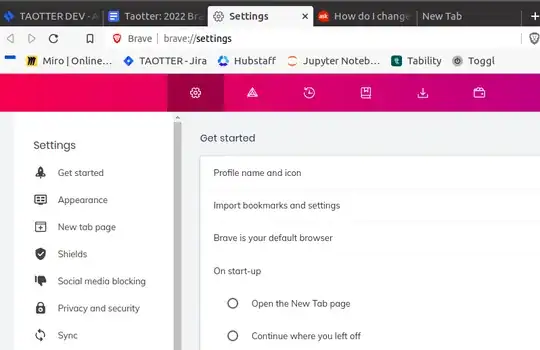

+Now set as default browser button(3rd link).

suhailvs
- 1,373