10

I did a clean install of Ubuntu 11.10 recently. Every so often, Grab Handles will appear on the active window. Sometimes they simply disappear after a few seconds without causing me any problems.

Other times, the mouse appears already grabbing the window (like when you grab the center handle) and the mouse and the window will shake erratically for a few moments. In this case, I lose control over the mouse until the grab handles fade out a few seconds later. This occurs multiple times a day, maybe once every hour or two. The oddest thing about it is that I don't have Grab Handles enabled:
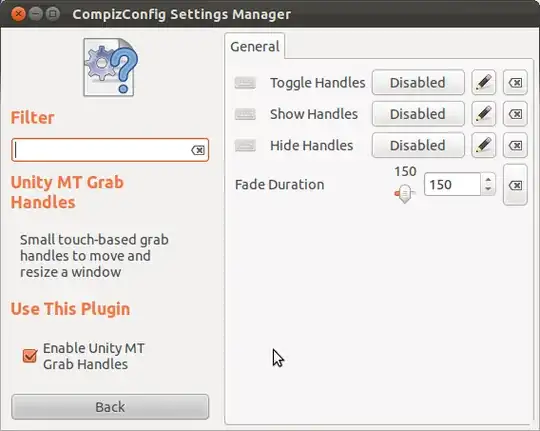
enter image description here

For reference, this is an Asus G53SW laptop with a Core i7, GeForce GTX 460M and 6 GB of RAM. Any ideas?

Doval
  • 295

2 Answers2

6

It would seem to me, despite the response in the comments, that disabling the Unity MT Grab Handles option in ccsm should be able to turn these off, erratic mouse behavior notwithstanding.

Steps to disable the grab handles:

  1. Install the CompizConfig Settings ManagerInstall CompizConfig Settings Manager (ccsm). You can do this either by clicking the provided link, or by opening a terminal and entering sudo apt-get install compizconfig-settings-manager, providing your password as needed.

    WARNING: ccsm has been known to break Compiz if you are not careful! Try not to mess around in it too much.

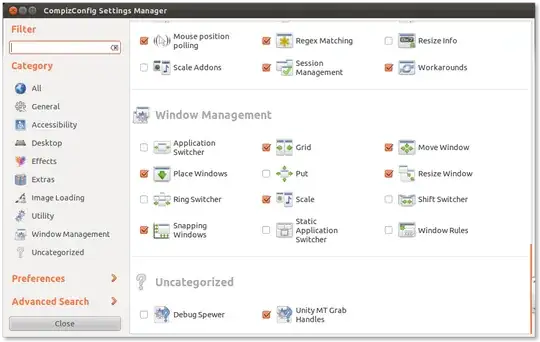
  2. Start CompizConfig Settings Manager. Look for a plugin called Unity MT Grab Handles. It should be at the very bottom when you scroll all the way down, under Uncategorized. Click its entry to enter its settings.ccsm main screen

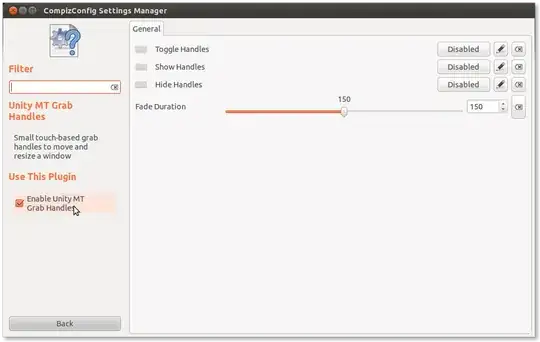
  3. Once in, find the checkbox labeled Enable Unity MT Grab Handles on the left side of the window under Use This Plugin. Uncheck it. This should be all you need to do; close ccsm.Unity MT Grab Handles plugin screen

If there is still an issue, then perhaps you should file a bug if then restarting Compiz does not work (compiz --replace).

5

I found a way to fix this while I was trying to find a way to redefine 3 finger gestures. I posted how I did it there: How can I disable arbitrary default multitouch gestures in Unity?

Let me know if that fixes it for you.

domster
  • 176