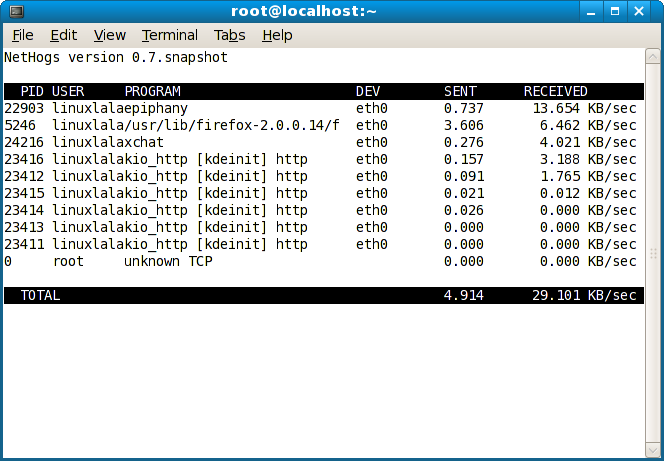
I can see in my System Monitor that data is being uploaded and downloaded, I can see in Etherape which sites it's connecting to and which protocol is being used. However without looking at the actual packets in WireShark and then finding the port and which process is listening on that port I am unable to tell which processes are uploading and downloading data. So I was wondering if there is an easier way that using WireShark (or some other tool) to find the port manually and then see which process is listening on that port? This application would ideally:
- Give me a list of processes
- Show me (in KiB/s) the amount of data being uploaded and downloaded (in different columns)
- Show me the PIDs of the processes
- Show me the ports which the processes are listening on
- Show me all this information in a table
- Be a CLI program (ideally, but it doesn't have to be in the CLI)
- Have the ability to change the update interval of the data
I am running Ubuntu GNOME 15.10 with GNOME 3.18, is there such a software that would meet my needs?