13

/desktop/gnome/peripherals/keyboard/general/disable_indicator in gconf is set to yes

Additionally I restarted, but it's still there.

Maybe there is some setting buried in CCSM?


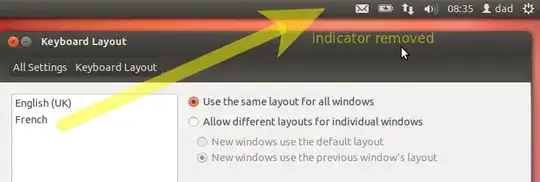
here is screenshot of what I'm talking about if it's not clear:

enter image description here

I want to remove it if possible

zetah
  • 9,871

6 Answers6

8

In version 13.10 and newer of Ubuntu you can just tick it off in Text 'entry settings' (last menu options when you click the keyboard icon). Tick off the 'show current keyboard' option.

Braiam
  • 69,112
mths
  • 81
4

If you find that the keyboard indicator is useless, you can easily remove the applet from top panel by following the steps below:

  1. Open System Settings from Unity Launcher or from top-right corner shutdown menu. Then click on Text Entry

  2. In the bottom of the window you’ll see “Show current input source in the menu bar” which is enabled by default. Uncheck the box and the indicator applet will disappear instantly.

4

enter image description here

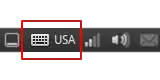
To completely remove the keyboard indicator we need to change one byte in the file

11.04 and before

/usr/lib/gnome-settings-daemon-2.0/libkeyboard.so

11.10 and after

/usr/lib/gnome-settings-daemon-2.0/libkeyboard.so

(make backup libkeyboard.so)

open file with root privileges through any hex editor (i use Bless)

and search for the byte signature FF 83 F8 01 0F

FF 83 F8 01 0F = if (g_slist_length (current_kbd_config.layouts_variants) > 1)

and change 01 to 02

FF 83 F8 02 0F

save file

FF 83 F8 02 0F = if (g_slist_length (current_kbd_config.layouts_variants) > 2)

if you have less than 3 keyboard layouts icon will be not shown

after this work need to reload gnome-settings-daemon

you can use reboot for this.
fossfreedom
  • 174,526
wep777
  • 56
3

You can very simply do this in Ubuntu 14.04 with Unity desktop for the current user in the terminal by issuing the following command.

gsettings set com.canonical.indicator.keyboard visible false

If the user is not logged into a currently running Unity session, you can set the setting by running this.

dbus-launch --exit-with-session gsettings set com.canonical.indicator.keyboard visible false
2

If you wished to remove the Keyboard icon and keep the Language selector then it is as follows:

@ Terminal

  1. find /usr/share/icons/ -name "input-keyboard.??g" -exec sudo mv {} {}.old \;

  2. for i in $(find /usr/share/icons/ -name '.old'); do sudo mv $i ${i%.}; done

If you wished to remove both the Keyboard icon and the Language selector then it is as follows:

  1. Open your Configuration Editor

  2. Click Apps --> gnome_settings_daemon --> plugins --> Keyboard --> Unchecked 'Active'

  3. Log out and log in. The Keyboard icon and the Language selector will not appear.

NB: If you couldn't locate your Keyboard at the Configuration Editor, then do this: http://gnome-look.org/content/show.php/?content=140209

all4naija
  • 1,554
0

It looks like "Keyboard Indicators plugins" may have been installed. Run the Software Center to check and remove it.

fragos
  • 3,583