my documents, music and video folders have been moved to a tab called bookmarks within file manager and cannot be found when I try to access them also the folders in the picture have decided to take up residence on my desktop and I have no idea why, can this be fixed and if so can you please provide instructions, thanks in advance.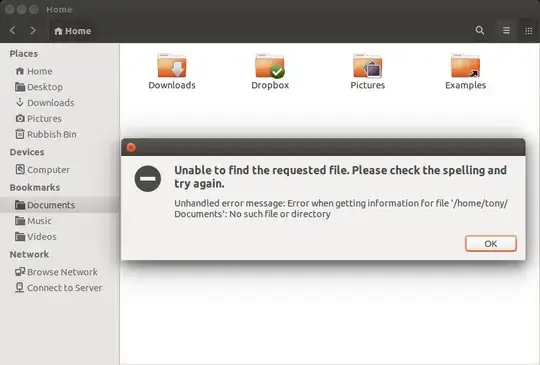
Asked
Active
Viewed 2,495 times
1

Tony Bartlett
- 71
- 1
- 6
1 Answers
0
The following steps should fix the problem:
Create user dirs inside your home directory (issue Ctrl+Alt+T to launch Terminal)
mkdir Documents Music Videos Desktop(normally, there should be also Pictures and Downloads dir, but they exist in your home, so I omitted them)
Boot into single user mode and try to fix the errors if any exist.
choose
fsckfrom recovery menu. From it's output, remember the disk node which will be/dev/sdXY.Xis letter, andYis partition number. For example, most systems have/dev/sda1though your home partition may be placed on another.choose
root. It will give you the root shell prompt.type
fsck -p /dev/sdXY.sdXYshould be replaced with your remembered disk node. This will automatically repair all fixable errors. Found files will be placed inside thelost+founddirectory.
Once you have finished, resume normal boot (hit Ctrl+D)
Update your user dirs
xdg-user-dirs-updateDistribute found files into corresponding directories.

