3

When using gedit , i always need to edit file in /etc/ or /usr/ which need to be root. So i created a Launcher shortcut on the left with command sudo gedit.

So every time i click the icon on the left Launcher, gedit will started as root. But the problem is that, when i modified other files, such as files in /home, the owner of file will also be changed to root. I don't want to do this, i just want to save this file without modifying its owner, and i don't want to bother every time to restart gedit as root to modify files owned by root. How to do it?

demonguy
  • 231

2 Answers2

8

Add a shortcut to your launcher.

I would not change the main command of the gedit launcher. Do the following:

  1. Never edit the default launcher, first copy the one from /usr/share/applications to ~/.local/share/applications:

    cp /usr/share/applications/gedit.desktop ~/.local/share/applications/gedit.desktop
    
  2. Edit the file with... gedit (not with gksudo)

    gedit ~/.local/share/applications/gedit.desktop
    

    Look for the line, starting with Actions=, Add gedit with gksu;:

    Actions=Window;Document;gedit with gksu;
    
  3. To the very end of the file add the shortcut section:

    [Desktop Action gedit with gksu]
    Name=gedit with gksu
    Exec=gksu gedit
    OnlyShowIn=Unity;
    
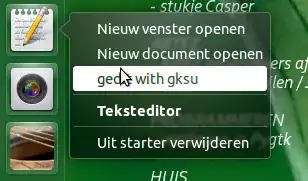
  4. Done, Now if you click on the icon, gedit starts "normally", while you have gksu gedit available as a shortcut:

    enter image description here


Directly browse for a file to edit

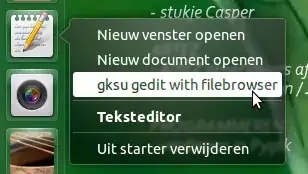
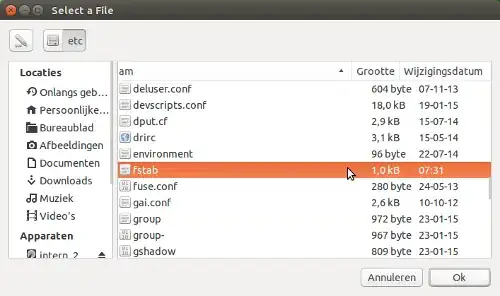
If you often edit files with gksu with gedit, you can also directly call a (Zenity) browser from the launcher, to open your files with gksu. You can "save" one step when opening files with gksu then:

enter image description here

enter image description here

  1. Copy & open the local .desktop file as in the first option
  2. Look for the line, starting with Actions=, Add gksu gedit with filebrowser;:

    Actions=Window;Document;gksu gedit with filebrowser;
    
  3. At the very end of the file, add the shortcut section:

    [Desktop Action gksu gedit with filebrowser]
    Name=gksu gedit with filebrowser
    Exec=sh -c "gksu gedit $(zenity --file-selection --title='Select a file')"
    OnlyShowIn=Unity;
    

Note

gksu is not installed by default, you will probably have to install it if you use the commands mentioned:

sudo apt-get install gksu
Jacob Vlijm
  • 85,475
0

You can modify the owner by opening a terminal up and typing in `chown user /path/to/file like Byte Commander stated you can do this. However, setting the the owner isnt enough. because you're accessing a root placed file in a root only access folder. You need to give your self full permissions.

To make your self like root for that file only you need to type in a terminal

chmod u+aw filenamewithextension

You must do this while being in the file's location.

After this, you can gedit without sudo and never have the system modify the owner. Do not sudo gedit or it will!

Virusboy
  • 1,566