6

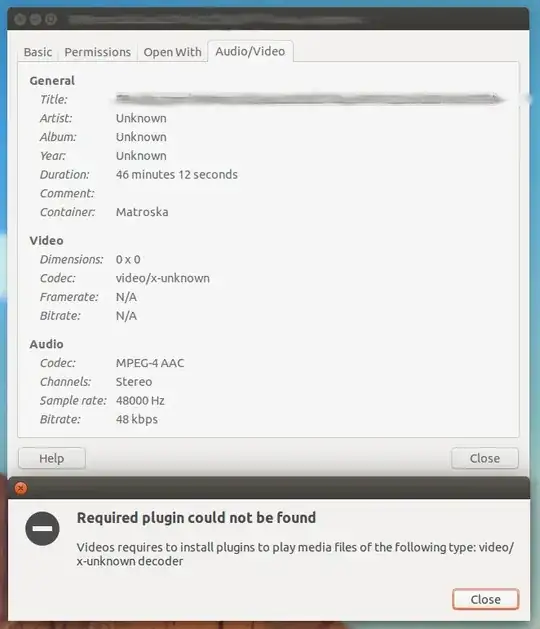
Properties of the file

I have this video file with the extension .mkv but it is not playing in totem video player and this works in the new versions of VLC(Windows) and I havent tried it on VLC for Ubuntu yet. Is there any way to make this file run on the default totem player?

5 Answers5

16

I had the exact same problem. This answer here solved the problem.

I followed the last one , i.e,

Install vlc with sudo apt-get install vlc and then install the required plugins to play *.mkv files by sudo apt-get install vlc-plugin-libde265

Note that, if the plugin installation gave you an error of not found, you will need to add it to the repo first

sudo apt-add-repository ppa:strukturag/libde265
sudo apt-get update

Now try opening the file in vlc.

Severus Tux
  • 10,126
2

I found it using the Ubuntu Software Center GUI instead of calling apt via console.

Ubuntu 14.04 > Ubuntu software center > Search for "VLC" > Install

This is whaty worked for me. No additional codecs needed.

Hope it works for you too!

voghDev
  • 121
1

I tried implementing solution given by @severus, but still I got the error. I solved the probelm by installing an additional package using this command.

sudo apt-get install gstreamer0.10-libde265

0

It seems you are missing the ffmpeg plugin for GStreamer. Install it with the following command.

sudo apt install gstreamer1.0-libav

0

Please go online (you must have internet connection running) when you try to run that file it will ask to search required codec then say yes it will install required codec, that's it.

Otherwise try this one:

sudo apt-get install ubuntu-restricted-extras
heemayl
  • 93,925
Harsh
  • 3