0

I have installed grsync so I can backup files from my laptop to my folder on a local server. When I run it manually, the files copy across, no problem.

I want this to happen automatically when I log in.

I have set up a Startup Application task but it does not work. Here are the commands I have tried:

grsync -e backupname    
rsync -e backupname    
/usr/bin/grsync   #(this opens the grsync gui on log in)

Can anyone tell me the correct command to put in startup applications?

Jacob Vlijm
  • 85,475

2 Answers2

3

Grsync is meant as a GUI to rsync. You can use it also very easily to "compose" The command, to use on startup (e.g. if you are unsure how to create the rsync command):

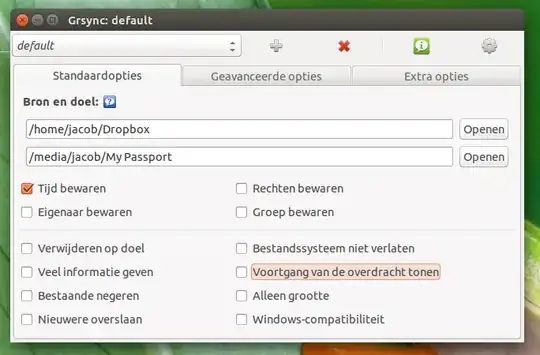
  • in Grsync, choose source and destination, as well as your options:

    enter image description here

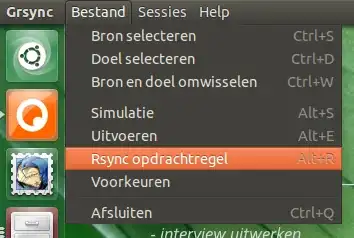
  • Choose "File" > "Command line":

    enter image description here

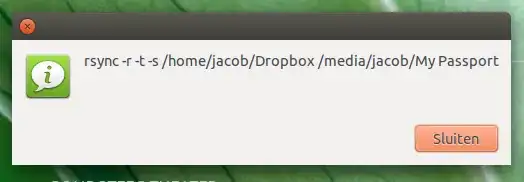
  • A window will popup with the command you are looking for:

    enter image description here

  • Copy the command you created in Grsync and add it to your startup applications:

    rsync -r -t -s /home/jacob/Dropbox /media/jacob/'My Passport'
    

    Add to Startup Applications: Dash > Startup Applications > Add

Notes

  1. After login, you might have to wait a number of seconds for the (external?) drives to be mounted. If so, you can do that as in the command below:

    /bin/bash -c "sleep 10&&rsync -r -t /home/jacob/Dropbox /media/jacob/'My Passport'"
    
  2. If you'd like to log your backups, simply add to you command:

    >> /path/to/logfile 2>&1
    

    so the command would be for example:

    /bin/bash -c "sleep 10&&rsync -r -t /home/jacob/Dropbox /media/jacob/'My Passport' >> /home/jacob/Bureaublad/log.txt 2>&1"
    
  3. If your command includes names with spaces (in the directory), place those names between quotes. From the example: My Passport should be: 'My Passport'

Jacob Vlijm
  • 85,475
0

This guide here explains how to launch and configure the rsync daemon on system startup.

Alternatively, you can add your commands to the end of the /etc/rc.local script that is executed upon startup. By adding your commands in here it will execute them when you startup your machine.

sudo nano /etc/rc.local

Then type in your commands that you wan't (be sure to add them before the exit 0 line), save the file with Ctrl + O and then exit nano. The commands should then be executed on startup.

Hope this has helped you out.

jkrix
  • 68