I am new to Ubuntu, have v. 14.04. I look on installed apps page and see user apps installed but find no way to access them, and no way to place an app link in the launcher, why is this? People would get more use out of Ubuntu if there were an apps page showing all installed programs. Second it is difficult to find where the program is loaded, as in Windows they have a program directory.
Asked
Active
Viewed 436 times

1 Answers
3
Your problem is typical for people who have just migrated from Windows. You don't know names of all software packages yet, and it may be difficult to find out which app does what. Luckily there is a simple solution:
Install Classic Gnome Indicator.
Open the terminal window by pressing Ctrl+AlT+T and write there:
sudo apt-get install classicmenu-indicator
Type in your password when asked.
If you prefer you may install it through Ubuntu software centre.
You can now see all the applications sorted by category through the indicator appearing on the right top part of the screen.
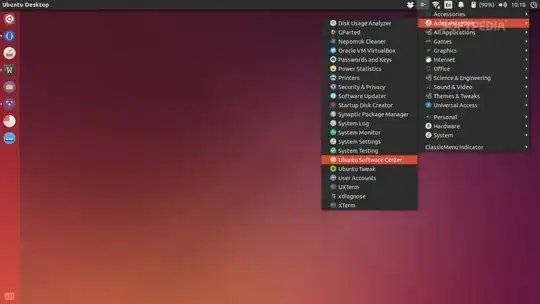
Read here for more info: Softpedia review for classic Gnome indicator
To learn to place an application link to the launcher see the link : how to put programs on the desktop It is easier than you think.

