0

Before anyone wants to mark this as a duplicate: I do not want to put my /home on another partition.

I'm going to buy a 250GiB SSD to replace the 640GiB HDD in my laptop computer. However, since 250GiB is too less space for my files and the system, I'm going to remove the DVD drive and install the HDD into the now-empty space using a HDD Caddy, where I want to put my files onto.

However, I still want things like ~/.config, ~/.local etc. on the SSD, since my HDD is a real performance bottleneck and applications will most likely load faster if all their config is on the SSD. But all other stuff I want on the HDD: Documents, Pictures, Music, ...

Is there any way to accomplish this in a way where I don't notice the partition difference? E.g. I'd like not to mount all my data at e.g. /media/data, but I'd like to have the directories from the HDD root mounted 1:1 inside my home. Where and how woud I have to mount the HDD root?

E.g.:

/home/username/
    .config/
    .local/
    .PlayOnLinux/ # -> not sure yet
    Documents/ -> HDD/Documents/
    Pictures/ -> HDD/Pictures/
    Downloads/ -> HDD/Downloads/
    .bashrc
    #...
    #Anything undefined to SSD
s3lph
  • 14,644
  • 12
  • 60
  • 83

2 Answers2

1

This is completely possible.

Mount your HDD via fstab.

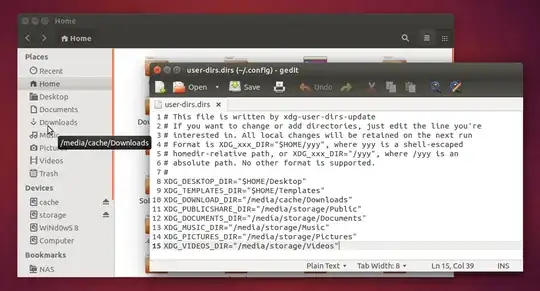
Modify the ~/.config/user-dirs.dirsin your home directory.

You can modify the entry by changing XDG_PICTURES_DIR="$HOME/Picture" to XDG_PICTURES_DIR="/<your_pictures_directory>".

The same thing goes for any other such directory.

My setup below:

This will also change the bookmarks in the places column so you can easily navigate across directories. Programs also don't have any problem whatsoever.

After this change, the programs will start using the new directories. Though the earlier folders will still exist, they wont be used by any programs. You need to remove them and replace them with symbolic links to your new directories. These symlinks are completely for our convenience only and have no impact on programs.

astrob0t
  • 1,766
1

the mount command as a bind option where you can mount a partition at a second place (sort of)

so you can have in your /etc/fstab something like

/dev/sdb3 /media/SSD_home ...
/media/SSD_home /home/username/.config none bind

the second line is to bind the mount to the correct place

This has not been tested; it's jsut an idea

solsTiCe
  • 9,515