How can I install a Beta version as an upgrade to an existing OS. I would prefer not to wipe out what is on the drive.
Asked
Active
Viewed 3,727 times


1 Answers
1
1st check if your update settings are correct:
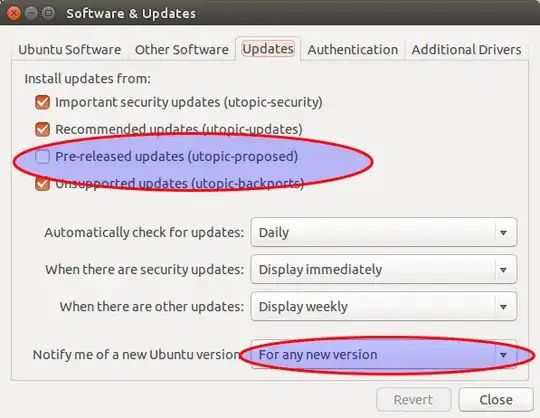
- The Ubuntu version shown after "pre-released updates" is the name of the new version. I have 14.10 installed on the image above.
- the "pre-released updates" needs to be active.
- the "notify me of new releases" needs to show "for any new version".
Warning please note that once you upgrade to newer Ubuntu, you cannot downgrade to Ubuntu thee older one. If the installation goes bad the only way to go back is a fresh install or to take out the time to fix any problem you encounter yourself.
The following 2 commands will upgrade your system to a newer release:
sudo apt-get update && sudo apt-get dist-upgrade
sudo update-manager -d
The 2nd command will open "Update Manager" and will notify you of a new release with something like this:
The software on this computer is up to date.
Ubuntu {new-release} is now available (you have Ubuntu {your-current-release}).
with a "upgrade" button. Click it and wait for it to finish.
The proposed option got moved to

at some point after 18.04

Rinzwind
- 309,379