10

I upgraded my Ubuntu from 12.04 to 14.04 and hotkeys for switching workspaces (Ctrl + Alt + arrow keys) are not working anymore.

I checked in System Settings > Keyboard > Shortcuts to make sure that they're assigned and they are, but why they are not working? How can I fix this problem?

Eliah Kagan
  • 119,640
Muodestis
  • 253

3 Answers3

13

I found the solution myself. It seems that I needed to enable Desktop Wall plugin in Compiz; just apt-get install compizconfig-settings-manager, run ccsm and search for "wall" to find the option.

kiko
  • 378
Muodestis
  • 253
2

This has broken for me a couple times now in Ubuntu; most recently after going from 12.04LTS to 14.04LTS (in place upgrade).

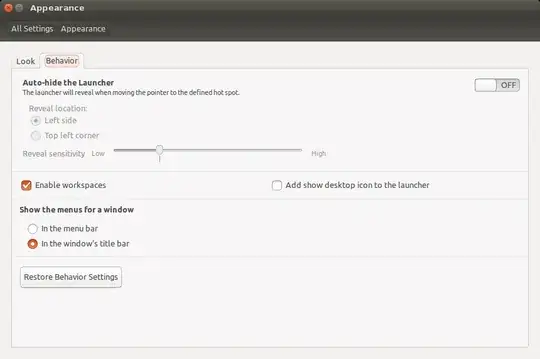
  • System Settings... (gear at top of screen)
  • Appearance
  • Behavior Tab
  • Check box for Enable workspaces

Screen grab of configuration setting for workspaces:

image

Videonauth
  • 33,815
0

Run these two commands:

sudo apt-get install ubuntu-desktop
sudo apt-get install unity

Reboot your system

And after than try Ctrl + Alt + arrow keys. You will able to switch between workspaces.