Is there a way to change the font size of chrome web browser bookmark bar on Linux? it does't vary with zoom out and zoom in options.
Asked
Active
Viewed 1.9k times

1 Answers
3
There was a bug in Chrome 35 that caused Chrome's UI fonts to be too small for many Linux users. If you are using that version of Chrome, you should update to the latest.
If that isn't the issue, and the fonts are still too small for your preference, you can change Ubuntu's system fonts, and Chrome will respect your settings (after restarting Chrome).
Taken from this answer:
# check current font
# for me, this returns Ubuntu 11
gsettings get org.gnome.desktop.interface font-name

# set it to something larger
gsettings set org.gnome.desktop.interface font-name 'Ubuntu 14'
If you prefer not to use the command line, you can change these settings using Unity Tweak Tool 
Note that this will change more than just Chrome's UI. As far as I know, there is no way in Chrome's settings (or chrome://flags) to change the font size of the interface.
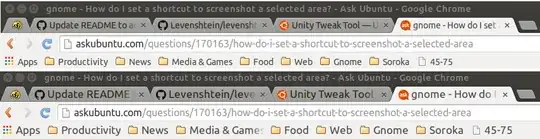
Before and after, with the default 11 and my change to 13:


Michael Martin-Smucker
- 6,612