2

In Ubuntu 11.04 (Natty), I cannot find the way to change Ubuntu logo (start-here) on Gnome panel.

I cannot do right-click on panel to change something, for example moving some indicator, changing background of Gnome panel.

Anyone know how to, please share it. Thanks in advance!

Binarylife
  • 16,662

2 Answers2

2

The Panel in 11.04 is a part of the new Ubuntu Interface Unity.

Now about moving indicators and right-click to add applets like previous versions of Ubuntu, this is not possible.

The only possible thing is to add more Indicators to the panel : List of Application indicators

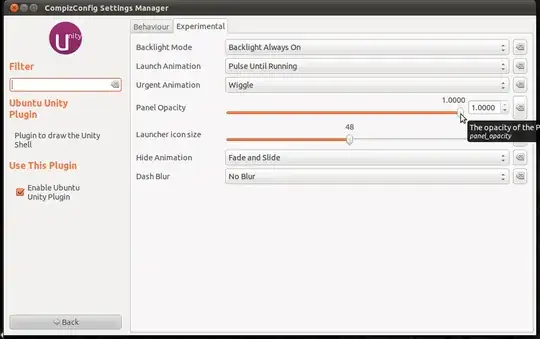
And there is a way to change the Opacity of the panel, by using ccsm: Click to install

This can be done by going to Desktop --> Ubuntu Unity Plugin --> Experimental

enter image description here

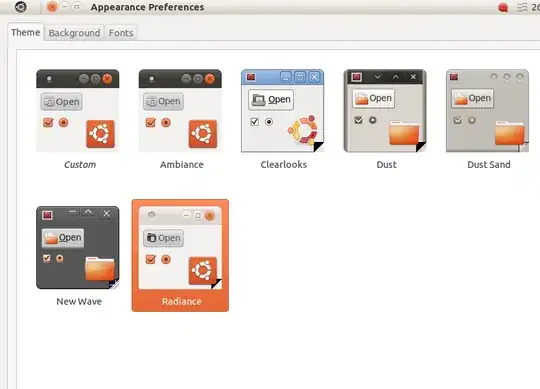
And for the Ubuntu Logo: This can be done by changing the theme or just the icons:

enter image description here

Binarylife
  • 16,662
0

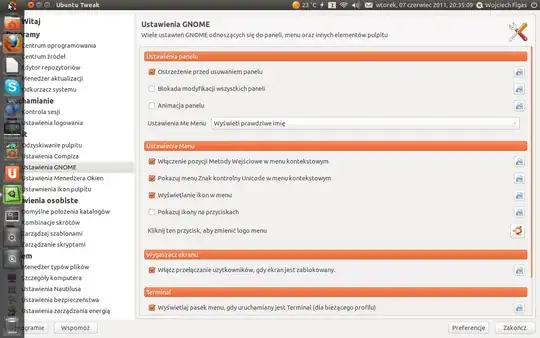
To change Ubuntu Logo - Start Here you wil need Ubuntu Tweak.

enter image description here

Go to Gnome Settings and there is a button to change it to whatever you want it to be.

Wojciech
  • 583