3

I am using a Lenovo Ideapad laptop with graphics card configuration as Radeon HD 8570A/8570M on Ubuntu 14.04. It shows me "The System is running in low graphics mode" while booting. So i am following this answer to solve my error.

I have tried amd-catalyst 14.4 and 13.12 from this site. But while installing these drivers, my terminal goes like this:
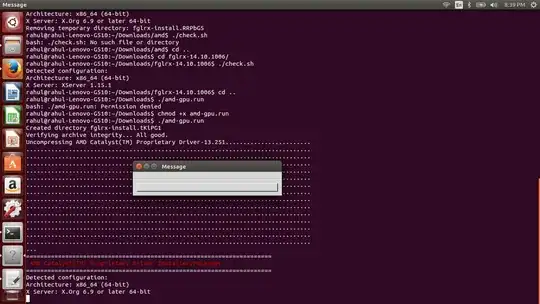
enter image description here

When I click or close the message box, the installation stops. So how do i install the appropriate driver?

Diffy
  • 131

2 Answers2

2

I tried this on my lenovo, it works.

http://ubuntuforums.org/showthread.php?t=2216720

ganda@Lenovo-G400:~$ /usr/lib/nux/unity_support_test -p
ATTENTION: default value of option vblank_mode overridden by environment.
OpenGL vendor string:   Intel Open Source Technology Center
OpenGL renderer string: Mesa DRI Intel(R) Sandybridge Mobile x86/MMX/SSE2
OpenGL version string:  3.0 Mesa 10.1.0

Not software rendered:    yes
Not blacklisted:          yes
GLX fbconfig:             yes
GLX texture from pixmap:  yes
GL npot or rect textures: yes
GL vertex program:        yes
GL fragment program:      yes
GL vertex buffer object:  yes
GL framebuffer object:    yes
GL version is 1.4+:       yes

Unity 3D supported: yes

ganda
  • 21
1

This is because you are running the installer as a normal user. Try to run it with: sudo ./amd-gpu.run

Frantique
  • 8,673