64

This seems to be a chicken-egg problem. The most common task using sudo is installing and removing software.

sudo apt-get purge <appname>

But sudo itself can be removed.

sudo apt-get purge sudo # Do not run this command on production computers!

This is where the fun comes

ubuntu@ubuntu:~$ sudo
bash: /usr/bin/sudo: No such file or directory

Although it's obvious that no person in his right mind will purge sudo (other than me), someone can be fooled to run this command (not directly, in its hex mode, or whatever it's called) or a person could SSH in disguised as tech guru and do the mess.

So is there a way of reinstalling sudo?

7 Answers7

61

I can install applications using:

pkexec apt-get install <appname>

From man pkexec:

  pkexec allows an authorized user to execute PROGRAM as another user. If
  username is not specified, then the program will be executed as the
  administrative super user, root.

So, I suppose that pkexec apt-get install sudo should work as well.


Edit: now I can confirm: yes, sudo can be installed using using pkexec apt-get install sudo:

reinstall sudo

(click to enlarge)

Radu Rădeanu
  • 174,089
  • 51
  • 332
  • 407
29

You can always boot into Recovery Mode, drop to root shell and install it without sudo.

22

Yes, reinstalling sudo package would be possible via chroot method.

  • First boot from Ubuntu live disk.

  • Mount the previously installed Ubuntu partition into whatever directory you want.In my case, i mounted it in /media/ubuntu.

    sudo mkdir /media/ubuntu
    sudo mount /dev/sdaX /media/ubuntu   # /dev/sdaX - previously installed Ubuntu partition.
    
  • By default you didn't able to get internet connection after chrooted into a partition.So run the below command to make it work.

    for d in dev sys run proc; do sudo mount --bind /$d /media/ubuntu/$d ; done
    

Thanks to @Oli for this wonderful piece of code .

  • Now chroot into that mounted directory,

    $ sudo chroot /media/ubuntu
    # apt-get update
    
  • Install sudo package by running,

    # apt-get install sudo
    
  • Now exit out of chrooted environment.

    exit
    
  • Finally boot up your Ubuntu OS.Now test your sudo command, it will surely works.

Avinash Raj
  • 80,446
4

Boot with the extra parameter init=/bin/sh on the kernel command line. This will put you directly into a root shell, from where you can simply run apt-get install sudo and then reboot. You may need to run /etc/init.d/networking start to get a working network connection first. Far simpler than messing around with recovery CDs or live disks, if you ask me.

Braiam
  • 69,112
Jules
  • 320
  • 1
  • 2
  • 12
1

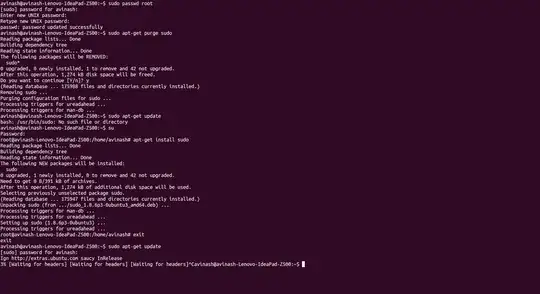
If you already set or update the root user account password by this command sudo passwd root then you don't worry about purging sudo.Just login into your root account and then install sudo,

su
apt-get install sudo

enter image description here

Click here to enlarge

Avinash Raj
  • 80,446
-1

sudo (and any other root privilege) only applies to the running OS. If you have been silly and removed sudo (or /usr/ for that matter) and don't have alternates like pkexec you can simply boot from something else, copy the missing software, and restart again.

Physical access nullifies any and all software security your system may have.

paul
  • 9
-2

This problem seems to be very ubuntu-specific. As non-ubuntu user I didn't even understand at first why sudo would be a special case in any way (a lot of distributions don't install it by default).

You don't need sudo at all. It's just a lazy shortcut that allows you to execute a root command without actually logging in as root. However, if you have to do anything more than a single command, it's just awful constantly prefixing everything with sudo. Not to mention that using sudo makes users ignorant about how permissions and root account work. It makes much more sense to just login as root, do the administration of the system and logout. That you do with su if you are already logged in as a regular user. Or you could log in directly as root.

Of course you need to have root password set, that's the reasonable configuration, otherwise you have a windows-like system where there are actions that nobody can perform and you are really locked out if somehow sudo isn't available (it requires working /etc/, set $PATH and other things mounted - which you may not have if something goes wrong early in boot).

orion
  • 97