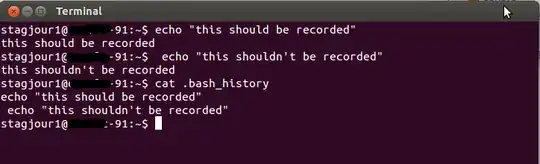
The commands executed in the terminal prefixed with blank space(s) are not recorded in the command history file. But is there a way to get the reverse i.e. the history should only record those which are prefixed with space?
Asked
Active
Viewed 2,926 times

2 Answers
13
You can reverse the default Ubuntu settings by setting two variables (HISTIGNORE an HISTCONTROL), use the commands like below:
HISTIGNORE='!( *)'
HISTCONTROL=ignoredups
HISTCONTROL=ignoredups changes history behaviour to only ignore duplicate lines, and not ignore lines starting with a space. (You can also set HISTCONTROL to the empty string (with HISTCONTROL= ) if you do want to keep duplicates, but that is usually not wanted.)
HISTIGNORE='!( *)' makes history ignore every line which doesn't start with a space: ( *) would match every line starting with a space, but the leading ! negates the match, so it matches everything which doesn't start with a space. And everything what is matched by the HISTIGNORE pattern will be ignored by history. (This latter option requires that bash is run with extglob turned on, with shopt -s extglob, but that is the default setting on Ubuntu.)
If you want to make this permanent, don't forget to put the above two commands into your ~/.bashrc.

falconer
- 15,334
4
"The commands executed in the terminal prefixed with blank space(s) are not recorded in the command history file"
Yes they are.

MrVaykadji
- 5,965