0

I want to finish making a minecraft server (TCP/UDP)

I already have a system that uses a private ip of 192.168.0.9

And a DNS on it that uses the public ip of 2.220.217.108, then redirects to it from helloworld.dyndns.org with ddclient

But when I start the server it lets me connect on minecraft through the internal ip but not the public ip or the hostname? The server uses port 25565 but I always get connection refused if I attempt to connect with the hostname or public ip?

I can connect to the server in my web browser but although the config is correct (as far as I know) I can't connect to it on minecraft, also even when I connect from the public ip it doesn't say if anyone attempted to connect to the server and was refused. Was this because the connection didn't get past the public ip or hostname firewall?

Maybe it's because my config in /etc/network/interfaces isn't right?

I am not able to use a static ip address in the config because my isp doesn't offer it

/etc/network/interfaces:
# This file describes the network interfaces available on your system
# and how to activate them. For more information, see interfaces(5).

# The loopback network interface
auto lo
iface lo inet loopback

# The primary network interface
auto eth0
iface eth0 inet dhcp
        post-up iptables-restore < /etc/iptables.up.rules
guntbert
  • 13,475

1 Answers1

1

I am going to start my answer by clarifying some facts/assumptions I pulled from your question:

  • Your domain name is helloworld.dyndns.org
  • helloworld.dyndns.org points to public IP 2.220.217.108 (this I tested and know)
  • 2.220.217.108 is your home IP.
  • The computer you are running a minecraft server on, has a private IP of 192.168.0.9 inside your home network.

Congrats, the good news is that you only have one more step and it does not require setting up a new DHCP server, rather just setting up port-forwarding on your router/hub, and optionally tweaking its DHCP settings.

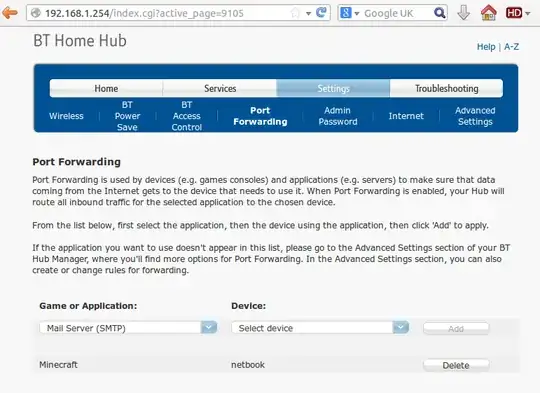
All that remains is to set up port forwarding on your "home hub" (router). Unfortunately, every router I have seen has a different interface and feature set, but 99% of the time there is an "advanced" are you may need to log into, and then there should be a tab/menu called "port forwarding" where you just need to specify the IP/MAC/Hostname of your computer (192,168.0.9) and the port you want to forward (TCP 25565)

enter image description here

DHCP Settings

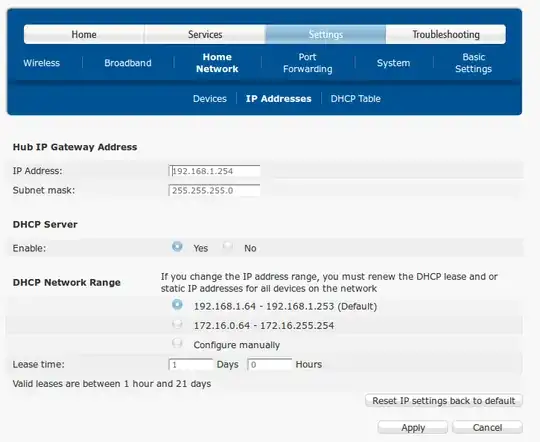
You can optionally tweak the DHCP settings on the router to prevent your private internal IP of your minecraft server (192.168.0.9) from changing (assuming its set to DHCP and not statically set). However minecraft should still work in the meantime. This is just to prevent you having to re-set up port forwarding every time your internal IP changes. It is best not to manually set your private IP to an address in the same range as the DHCP pool of your router as this can (low risk) lead to an IP clash (two devices using the same IP)

Thus the easiest solution is to check the IP range of the DHCP pool (shown below) and set your server's IP to something that is in the same subnet but not the same address pool. 192.168.1.1 - 192.168.1.63 in the picture below: enter image description here

Either that, or some routers allow you to manually set a static/reserved IP from within the DHCP pool to a device based on its MAC/hostname.

Reference Material - Minecraft Wiki - Setting Up A Server

Programster
  • 6,039