6

I used badblocks to scan a partition on my hdd for bad sectors and it gave me the following output
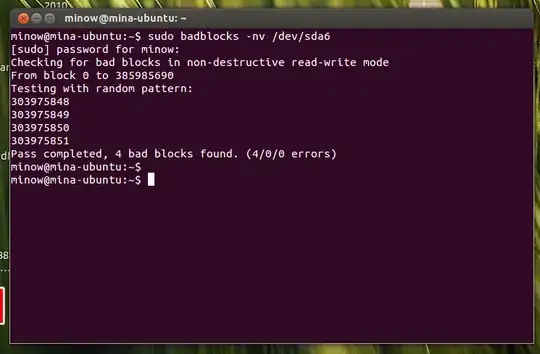
output

...from what I understand it looks like "one scratch on the hdd" ... anyways I can't partition with gparted because of this bad sector (my previous question: I need help with increasing the size of the file-system partition. Partitioning-o-phobia!) gparted still gives me "a red exclamation mark" on the drive after the badblocks test. ...now what?

I have also tried chkdsk on windows but still gparted gives the red mark

How do I mark this bad sector so that gparted can do its work? :) ...plz exclude answers about "replacing the hdd" I know I can do that.

842Mono
  • 10,070

2 Answers2

9

Try writing to those blocks:

sudo dd if=/dev/zero of=/dev/sda6 bs=1024 count=1 seek=303975848
sudo dd if=/dev/zero of=/dev/sda6 bs=1024 count=1 seek=303975849
sudo dd if=/dev/zero of=/dev/sda6 bs=1024 count=1 seek=303975850
sudo dd if=/dev/zero of=/dev/sda6 bs=1024 count=1 seek=303975851

(or in your case, you could collapse that to a single dd call with count=4)

Then run badblocks again.

On a modern hard drive, the controller already knows the blocks are bad, and will remap them, but still cannot provide the data from the previous location (since it's bad). Writing to the blocks will cause everything to look good again, and then you don't have any need for the filesystem to take care of it.

If this does work, then the second run of badblocks should find no bad blocks.

Robie Basak
  • 15,910
9

...well now gparted says it's clean!! AT LAST!! ...anyways I'm not sure what exactly solved the problem but I'll list what I've done backwards:

sudo ntfsfix -b /dev/sda6 which gave out:

Mounting volume... OK
Processing of $MFT and $MFTMirr completed successfully.
Checking the alternate boot sector... OK
NTFS volume version is 3.1.
Going to un-mark the bad clusters ($BadClus)... OK
NTFS partition /dev/sda6 was processed successfully.

but before that I did:

sudo dd if=/dev/zero of=/dev/sda6 bs=1024 count=1 seek=303975848
sudo dd if=/dev/zero of=/dev/sda6 bs=1024 count=1 seek=303975849
sudo dd if=/dev/zero of=/dev/sda6 bs=1024 count=1 seek=303975850
sudo dd if=/dev/zero of=/dev/sda6 bs=1024 count=1 seek=303975851

and before that I did

sudo badblocks -nvs /dev/sda6 ... which took 2 whole days to finish!

anyways, lastly, before the last command, I opened windows 7 and used the chkdsk utility (right click the partition, properties, "tools"(or something like that), check for errors)

I hope this helps anyone.

842Mono
  • 10,070