1

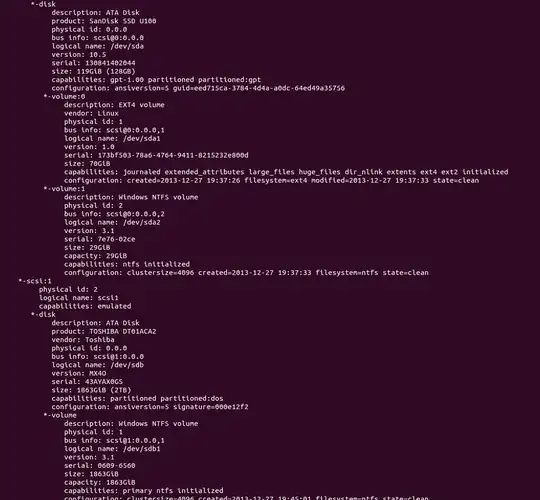
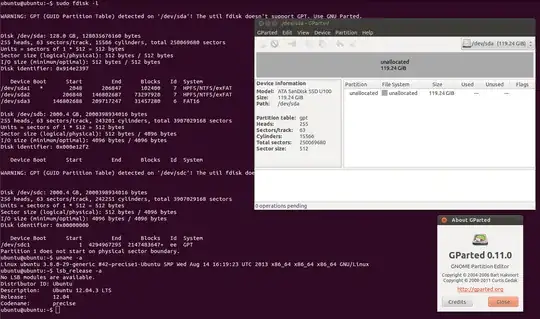
I'm trying to install a dual boot on SSD 120 GB using win 7 and ubuntu 13.10/12.04. To avoid redundant trouble I'm trying to install win7 first (and partition the system there) and then use that partitioning to install linux. However, after a successful windows installation when I open gparted (from a live CD) and it says that all the devices have unallocated memory (only ssd shown on the screen but every single device has same thing). When I proceed to installation I get the same unallocated spaces thing.

Question: what can be the reason of this and how can I resolve it to simply install ubuntu on ssd?
enter image description here

Denys S.
  • 199

2 Answers2

2

You apparently had partitioned the disk using GPT at one point, then used a non GPT aware partitioning tool ( fdisk maybe? ) to re-partition the disk using an msdos partition table. The GPT is still there, and that is what (g)parted is looking at instead of the msdos partition table. You need to remove the invalid GPT if you want to stick with msdos:

sudo apt-get install gdisk
sudo gdisk /dev/sda
x # xpert mode
z # zap gpt

This is the case for your sda only. Run sudo parted -l and add it to your question to see what's wrong with the other drives.

psusi
  • 38,031
0

This question answers it perfectly. And apparently windows converts the sector or block size to 512 bytes, however if reformatted with gparted the sector size becomes 4096 bytes. As follows: enter image description here

Denys S.
  • 199