I do not find an option to change the window behaviour that was in Appearance Properties.
In particular I find it very annoying that Nautilus is always maximised when opening it.
Is there a way to change that default behavior?
I do not find an option to change the window behaviour that was in Appearance Properties.
In particular I find it very annoying that Nautilus is always maximised when opening it.
Is there a way to change that default behavior?


In 11.04, when Unity is the default for desktops as well as netbooks, this behaviour will be set based on screen size by default, but also customizable in Appearance Properties. You will be able to let the system decide, or configure it always to maximise (except blacklisted apps) or never to maximise.

The window is maximized if it is started with a size over 75% of the display.
You can unmaximize hitting the button or double clicking the title.
Note that there is a bug in this behavior, not all windows respecting that.
Why do firefox 4 and evolution always open maximized in Unity?
https://bugs.launchpad.net/unity/+bug/754214
I'm at mobile so I wiil fix the layout when I get home.
Install CompizConfig Settings Manager.
sudo apt-get install compizconfig-settings-manager
Launch it by searching from the dash in Unity, or Preferences > CompizConfig Settings Manager in Ubuntu Classic
Navigate to the Place Windows tab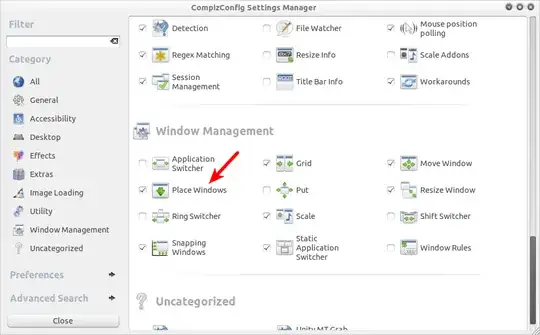
Adjust Placement Mode to your
liking.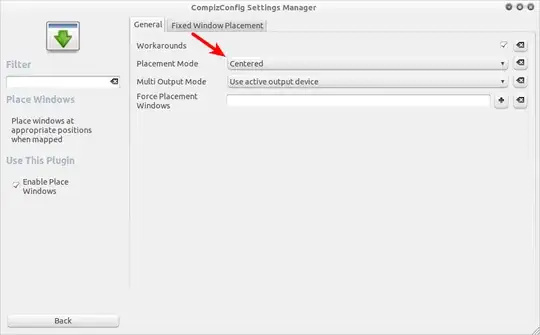
That seems to be the wanted behaviour, according to this bug:
That's wanted. Unity in maverick is the netbook edition, made for small screen. So, all applications are maximized by default.
I guess you will have to wait until the Desktop version of Unity is released, which will happen "as soon as possible".
I can't comment because my OpenID is broken so I can't log in as a privileged user, but (at least on 11.10) you can address the 75% rule in Compiz, too: it is currently under Desktop > Ubuntu Unity Plugin > Experimental
Set this value to 100% and all windows should open at their previous size.


