I'm using English, Russian and Armenian keyboard layouts. When I'm trying to change layout it's changing "en" -> "am" -> "ru" -> "en"... I want to use Left Alt + Shift to toggle "en" and "am", and Right Alt + Shift to toggle "en" and"ru". Can you help me?
Asked
Active
Viewed 1,089 times

1 Answers
0
There are many shortcuts to choose to switch between keyboard layouts, but none fits with what you want.
Anyway, it can be done using a bash scripts and two custom shortcuts.
First, create the script, let's call it change_layouts:
#!/bin/bash
#script to switch between two keyboard layouts

if [ $# -ne 2 ];then
    echo "Usage: `basename $0` first_layout second_layout"
    echo "   ex: change_layouts us ru"
    exit
fi

first_layout=$1
second_layout=$2

if [ -z "$(ls -l /usr/share/X11/xkb/symbols | grep ^- | awk '{print $9}' | grep $first_layout)" ]; then
    echo "Error: Doesn't exists ant keyboard layout called '$first_layout'."
    exit
fi

if [ -z "$(ls -l /usr/share/X11/xkb/symbols | grep ^- | awk '{print $9}' | grep $second_layout)" ]; then
    echo "Error: Doesn't exists ant keyboard layout called '$second_layout'."
    exit
fi

if [ "$first_layout" = "$second_layout" ]; then
    echo "Error: The arguments (keyboard layouts) must to be different."
    exit
fi

current_layout=$(gsettings get org.gnome.libgnomekbd.keyboard layouts)

if [ "$current_layout" = "['$first_layout', '$second_layout']" ]; then
    gsettings set org.gnome.libgnomekbd.keyboard layouts "['$second_layout', '$first_layout']"
else
    gsettings set org.gnome.libgnomekbd.keyboard layouts "['$first_layout', '$second_layout']"
fi
Save the script in your ~/bin directory and don't forget to make it executable:
chmod +x ~/bin/change_layouts
Now you can test the script in terminal. Run it more times to see how it works.
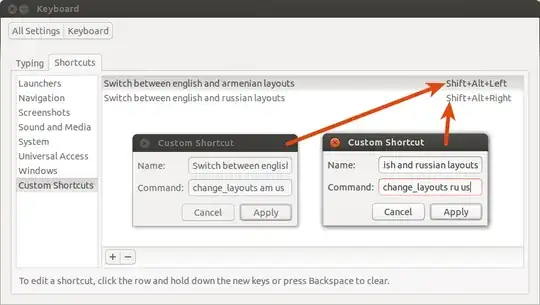
Second, add your custom shortcuts. Go to System Setting → Keyboard → Shortcuts → Custom Shortcuts and follow the instructions from the below image:


Radu Rădeanu
- 174,089
- 51
- 332
- 407