2

I am a novice Linux user and accidentally uninstalled a lot of packages. I was attempting to do a clean install of Wine using the advice on this help page: How do you uninstall wine 1.5? and before I noticed a warning by a later user, I opened my terminal and executed:

apt-get remove wine\*

Apparently apt-get interprets characters like * as symbols in a regular expression, not as shell-style wildcards, and I just removed most packages with the string "win" in their names on my computer.

I exited the terminal before everything shut down. Is there a way to reinstall these packages and patch my system without doing a fresh OS install?

Poxls88
  • 21

3 Answers3

3

You may want to to do a backup followed by a complete reinstall.

I have just tried this on a Virtual machine to see the effects.

sudo apt-get remove wine\*

This warned me that I was about to remove 120 packages including

Removing account-plugin-windows-live ...
Removing aisleriot ...
Removing apt-transport-https ...
Removing nautilus-share ...
Removing apturl ...

amongst others

I would have stopped there on a real system as that should be enough to tell you you are doing something wrong. But as this is only a test system I pushed on.

My complete list is here : Ubuntu Pastebin

You can find a list on your system at /var/log/apt/term.log I copied this to an external drive and printed it out.

When I rebooted Unity had gone so I had to use Ctrl+Alt+F6 to get to a text console.

You may be able to restore each of these with

sudo apt-get install package

replacing package with each of the package names. I've tried a few and it looks like its working though you will get some "this package is already installed" errors as installing one package may pull others in as dependencies so its already installed by the time you ask to install it.

It will probably be easier to boot with a live DVD or USB stick copy your personal files then reinstall than to manually put all the packages back. That's what I would be doing if it had happened to me.

Warren Hill
  • 22,412
  • 28
  • 70
  • 88
1

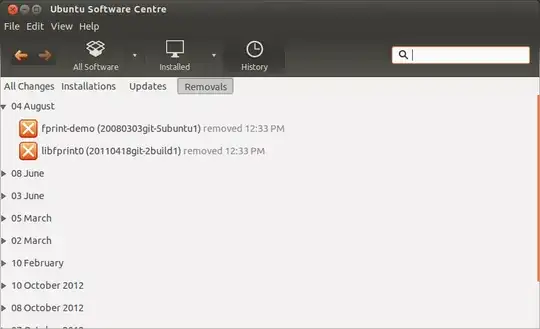
If you open the software centre the select History > Removals you will see a list of software removed from your computer by date as shown:

enter image description here

You can use this to see what packages were removed so you can reinstall them.

Note: apt-get remove wine\* should have removed the packages but not the configuration files so your settings should be OK.

Warren Hill
  • 22,412
  • 28
  • 70
  • 88
0

I encountered similar issue while mistakenly --purge wine* Which I managed to resolve using following steps:

. CTRL + ALT + F1 . sudo vi /etc/resolvconf/resolve.conf.d/tail

adding these two lines to the file

nameserver 8.8.8.8 nameserver 8.8.4.4

save using ESC then : then :wq

. sudo /etc/init.d/resolvconf restart . sudo apt-get install ubuntu-desktop . sudo apt-get upgrade . sudo apt-get update . sudo reboot

Thank you hope this helps

Amit