I want to install Wine only for running a program, but I don't want to open any other Windows file (for security). Is it possible to ensure Wine does not execute .exe files automatically? Thank you.
Asked
Active
Viewed 4,713 times


8 Answers
4
When you install the wine package, it registers itself so that .exe files, if run from the command line, will "auto run via wine" if they match a specific signature and have executable bit set (like via chmod +x).
To prevent accidental direct execution of exes from console like
/path/to/program.exe
you can setup binfmt_misc kernel module with the following command:
sudo update-binfmts --disable wine
This will disable support for direct execution of files with magic MZ.
CAVEAT: this appears to be undone on restart or Wine upgrade.
If you really want to get rid of it (until wine upgrade!), run
sudo update-binfmts --package wine --remove wine /usr/bin/wine

Ruslan
- 1,863
3
As far as I know, wine does NOT execute .exe files by default, based on my experience so far with Wine on Ubuntu 13.04.
I'm not sure if previous Ubuntu/Wine versions allowed it automatically run executables, but at least you can be fairly certain that that is not currently the case.

Raghd Hamzeh
- 242
3
Wine does not run files automatically (poor wording choice on your part).
However, if you want exe files to open with something else by default, you need to change the associated program for exe files to something other than Wine (you can do this from the properties window in Nautilus).
To run your program, you can create a .desktop file or simply use "Open With" from the context menu.

RolandiXor
- 51,797
1
Wine doesn't associate with .exe files by default on most systems, and depending on your installation, it 'may'.
The EASIEST way for you to do this would be to install the program Ubuntu Tweak, this can be downloaded from here: Ubuntu Tweak Download Instructions
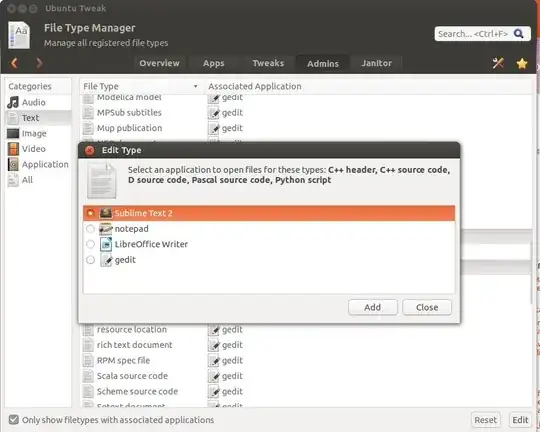
Once you have it downloaded you simply open it up, change to Admins tab and then under System choose File Type Manager. Once in here select the file category Text and using shift-click and/or control-click select all of the file types you want, then click Edit on the bottom right.
This will allow you to multi-set the mimetype opener for all of the files.
See screen:
I believe that this is what you need in addition to the above point: How to prevent Wine from adding file associations?


0
I found the best way in the man page for binfmt.d. To override a rule, create a symlink in /etc/binfmt.d to /dev/null with the same name. In the case of wine, the package file is at /usr/lib/binfmt.d/wine.conf and can be overridden with
sudo ln -s /dev/null /etc/binfmt.d/wine.conf
This change is permanent and will survive reboots and wine updates.

ThunderBird
- 1,963
- 13
- 22
- 31

Tasnad
- 1
0
While using ubuntu 23.10, I found this to be the default behavior. Neither double-clicking nor attempting to execute via commandline would run a file with extension .exe with wine.

HaskellElephant
- 148
0
Wine doesn't run .exe files by default unless you add such an association rule. If you did, remove it from Nautilus properties.

joon
- 33
0
One option is to rename your wine executable, ex:
sudo mv /usr/bin/wine /usr/bin/wine.disabled
or the like. Just remember to remove that or rename it if you remove the wine package :)
Sometimes configure scripts will still use "wine64" if it's present (and update-binfmts might not be enough of a work around), so you may need/want to rename that as well.

rogerdpack
- 1,029