85

This question exists as it fills a specific criterion. While you are encouraged to help maintain its answers, please understand that "big list" questions are not generally allowed on Ask Ubuntu and will likely be closed per the FAQ. More information on the software-recommendation tag.

What download managers are available for Ubuntu? Can you provide the link as well?

Ashish
  • 307

47 Answers47

82

I would recommend the wget command line utility which is absolutely awesome!

wget is a GNU free software package that is used for retrieving files over the web. If you have got it installed, then all you have to do is to get the download link and use wget to download it.

In order to get the download link, right click on whichever download you want in the firefox download manager. There will be an option ‘copy download link’. Click on it.

Then open a terminal and go to whichever folder you want the file downloaded to. Assuming it is in the Desktop, type the following command at the prompt:

$ wget <paste your download link here>

Now even if it gets stuck in the middle, you can resume from wherever it was interrupted by giving the option -c to wget. That is, the command will be like

$ wget -c <paste your download link here>

And there it continues beautifully.

Jacob Tomlinson
  • 1,218
  • 10
  • 21
30

Axel is great! There is no limit on the number of connections, and you can utilize your bandwidth.

To install axel use this command:

sudo apt-get install axel

It's a CLI application. So open a terminal window and type in axel For more information and checking available options, you can look at the help page. I usually use these options:

axel -avn 50 address

It provides more information (-v), displays the alternative progress bar (-a) and downloads with 50 simultaneous connections (-n 50).


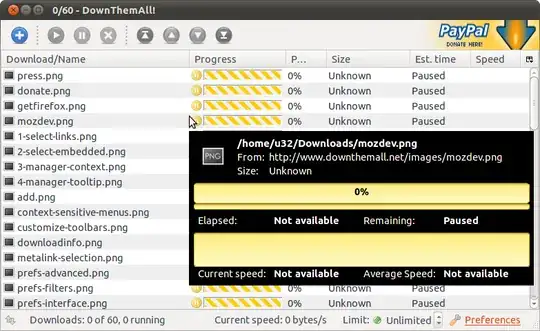
Downthemall extension for firefox is also great.

enter image description here

[Install it from here](https://addons.mozilla.org/en-us/firefox/addon/downthemall/ or search downthemall in the addon manager.)

Zanna
  • 72,312
Pedram
  • 5,811
26

Try using FatRat download/upload manager , though a QT based but supports a lot of Features and is continuously extended.

Some of its features:

  • HTTP(S)/FTP downloads
  • FTP uploads
  • Support for SOCKS5 and HTTP proxies
  • RSS feed support + special functions for TV shows and podcasts
  • BitTorrent support (including torrent creating, DHT, UPnP, encryption etc.)
  • Torrent search on major torrent sites incl. The Pirate Bay, EZTV, BitTorrentMonster...
  • RapidShare.com FREE and premium downloads
  • RapidShare.com uploads
  • RapidShare.com link verification and folder extraction
  • RapidSafe link decoding
  • MD4/MD5/SHA1 hash computing
  • Remote control via Jabber (!)
  • Remote control via an AJAX* web interface
  • Subtitle search
  • RAR/ZIP file unpacker
  • Scheduler
  • Clipboard monitor

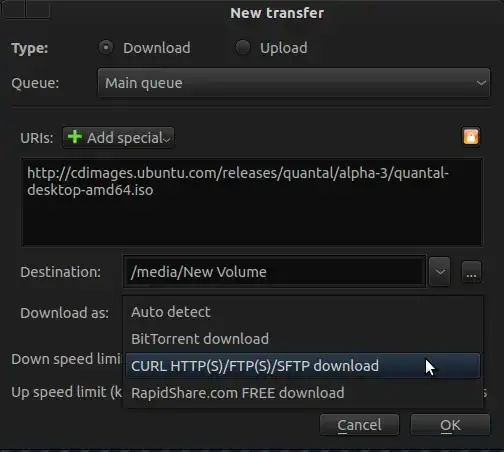
You can even select the Download Protocol client, if supported as

enter image description here

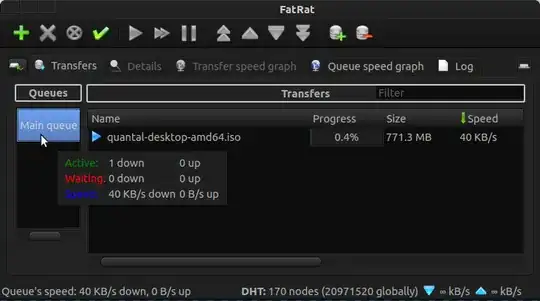
On main Window , you can browse options like Details, Transfer speed Graphs ,Queue speed Graphs and Logs.

enter image description here

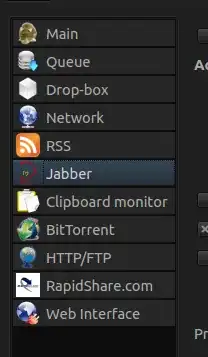
From settings window , you can setup FatRat for the following services

enter image description here


Other Useful Links :-

For Browser Integration

For Plugins and for Extensions

For FatRat Documentation

Official FatRat Page

wjandrea
  • 14,504
atenz
  • 12,858
22

There are plenty of them available.

Steadyflow

Steadyflow is a simple and easy to use download manager, written in GTK. It has a lot of good features without any unnecessary complexity.

enter image description here

It also has an indicator applet.

enter image description here

Install: sudo apt-get install steadyflow


Uget

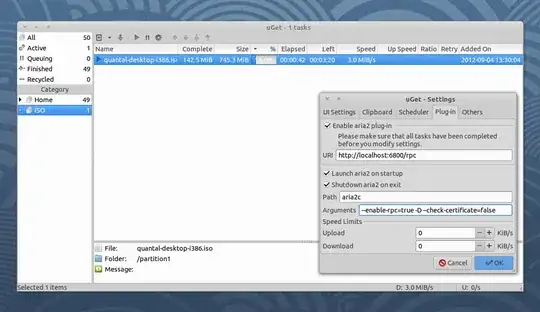
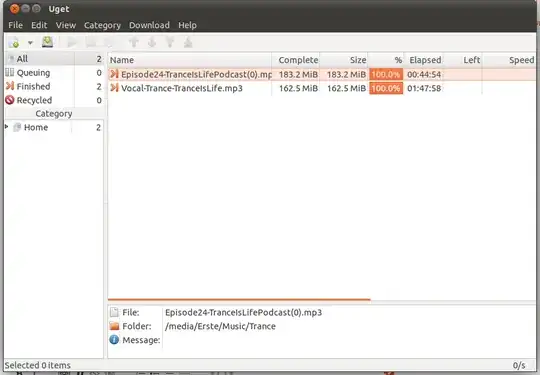
uGet is a multi-platform GTK3 download manager that supports resuming downloads, comes with categories support, can download torrent and metalink files through aria2, a powerful command line download tool that's integrated into uGet.

enter image description here

Install:

sudo add-apt-repository ppa:plushuang-tw/uget-stable
sudo apt-get update
sudo apt-get install uget aria2

Jdownloader

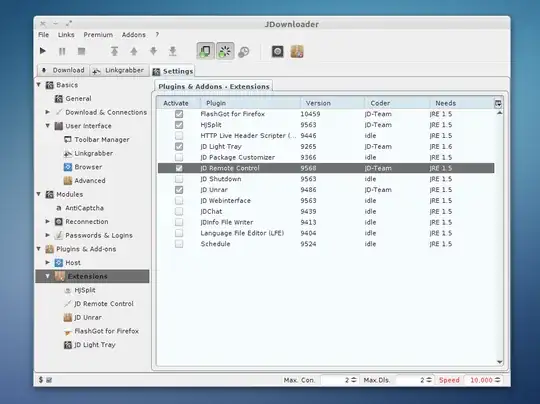
JDownloader is a free and open source cross platform (Linux,Mac ..) download manager, written in Java, which allows the automatic download of files and split files from one-click. Additionally, many “link encryption” sites are supported – so you just paste the “encrypted” links and JD does the rest.

enter image description here Install:

sudo add-apt-repository ppa:jd-team/jdownloader
sudo apt-get update 
sudo apt-get install jdownloader-installer   

Aria

Aria is not a GUI download manager, but it can be used via several Firefox extensions. Two of them are:

Install: sudo apt-get install aria2


Gwget

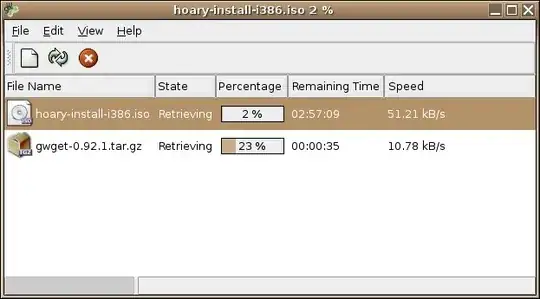
Gwget is a gnome frontend for the popular downloading application wget. gwget also has firefox integration with the help of the firefox extension FireGet. However, it is not updated since 2009.

enter image description here


More Information

Steadyflow

Uget

Jdownloader

Zanna
  • 72,312
green
  • 14,406
12

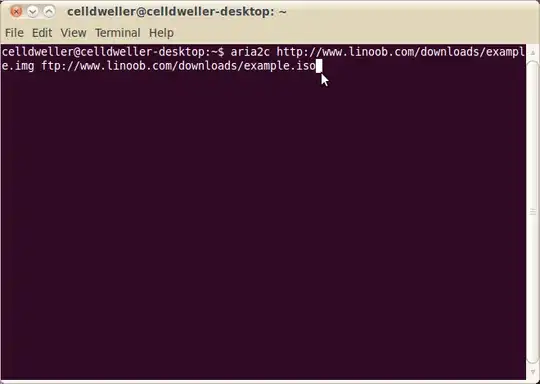
No one can beat Aria2, Best Downloader I have seen ever. It can resume your download after several months, even from Mediafire. The Only drawback is - its a command line tool. But don't be afraid, it is quite easy to use. It also integrates with uGet as a plugin so you can use uGet as a GUI for aria2.

Install it with the command

sudo apt-get install aria2

enter image description here

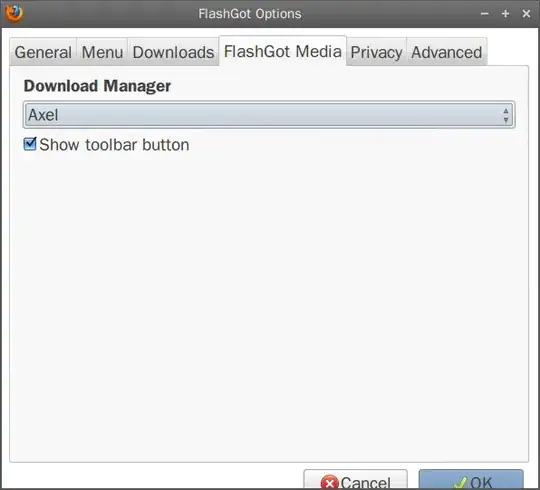
You can also install Flashgot addon on Firefox, and set aria2 as Flashgot default downloader. That way, whenever you click to download something, flashgot will automatically download it with aria2.

Zanna
  • 72,312
Aloksarak
  • 61
  • 1
  • 2
11

Do you mean a download manager for ubuntu 10.10?

If so, i prefer jDownloader. jDownloader on PPA

enter image description here

There you also can see how to install it.

Geelu
  • 329
10

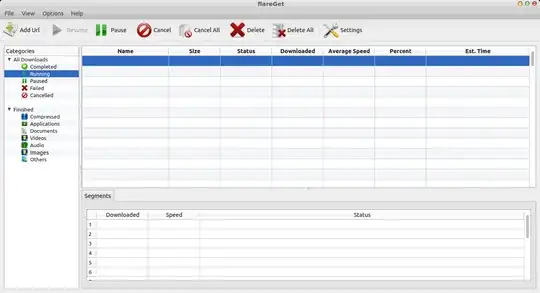
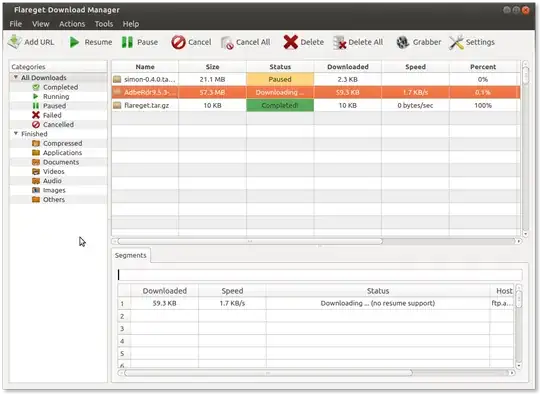
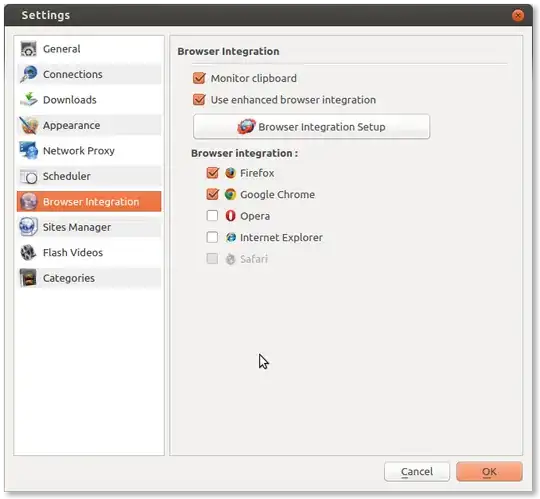
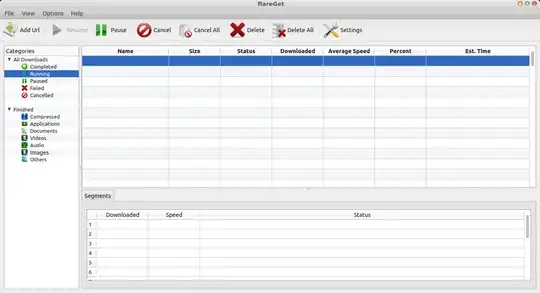
Flareget is probably the best download manager available for Linux (quoting from softpedia.com) It is highly stable and has almost all the features you can think of. It is multi-threaded and supports upto 16 segments per download for download acceleration. It has inbuilt browser integration and YouTube video download support for all the browsers. It is also actively maintained and a pro version is also available.

This is not free software. Limitation of free version: only 2 segments per download of files larger than 25 MB. (as of v. 3.2.42 in 2014)

enter image description here

Zanna
  • 72,312
9

I still prefer to use wget on files.

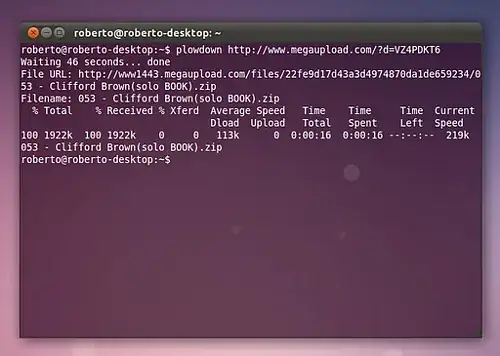
Or you can try plowshare which is a command-line tool:

plowshare

jokerdino
  • 41,732
Barz
  • 784
9

UGet

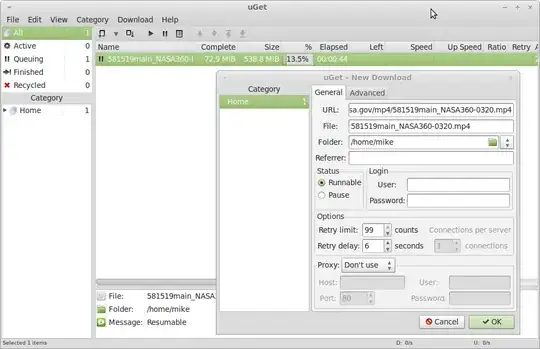
The program uGet is available in the repositories and is an excellent download manager with many useful options. As you can see in the screenshot below, it can pause a large download and resume it successfully (if the server supports resuming). I have used it with great success to download large and small files alike.

You can also queue and classify downloads and allow it to monitor the clipboard for potential downloads. Bandwidth can be controlled per download or on a global scale and, if necessary, you can specify a proxy to use. When flashgot is installed in firefox, uGet can be chosen as the default download manager for that browser.

uGet in action with a large file partially downloaded and paused: :

To boost speed by using multi-thread downloads, enable area2 plugin:

enter image description here

9

Axel is the true Download accelerator for Ubuntu. It is a command-line based tool (which comes with a gui version which starts the download in a terminal window).

To instal : sudo apt-get install axel axel-kapt

Axel-kapt is the gui-version.

Downloading via axel is as simple as typing axel url on a terminal. Useful flags include :

  • -n to control number of simultaneous threads.

  • -a for a much simpler download progress bar (akin to wget)

  • -o to specify an output file

You can install Download Helper extension in Chrome (which allows axel to take over downloads in chrome).

In Firefox it can be easily used with FlashGot addon as alternative to the default downloader.

enter image description here

enter image description here I also use it with plowdown as an alternative to jdownloader (automatically downloads files from various websites, automating the browser)

Nemo
  • 9,610
7

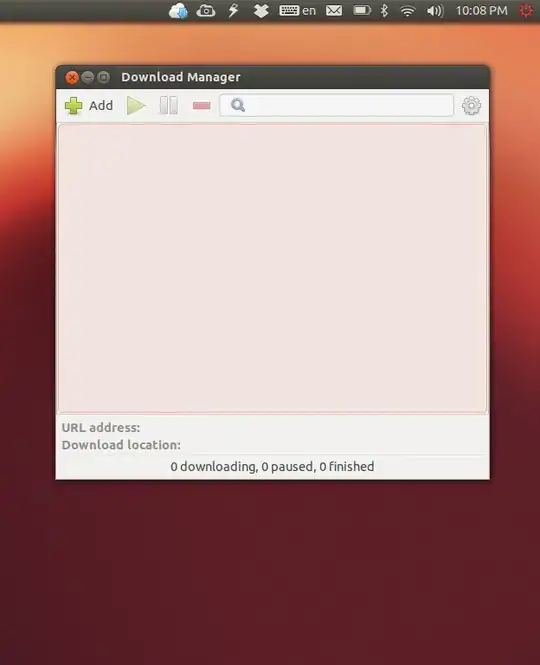
You should try steadyflow Install steadyflow It seems quite good. and it integrates with unity. Do you see the cloud icon with the blue arrow in the top bar?

enter image description here

If you want to integrate it with Firefox, try the Flashgot plugin. For Chrome(-ium), use Chromeflow.

funkeh
  • 384
6

Even if i have no problems downloading big files with any downloader (maybe there is something wrong with your filesystem or internet connection) I can recommend the DownThemAll - Addon for Firefox

But maybe you can explain what you mean by "...none of them work..."

Zanna
  • 72,312
6

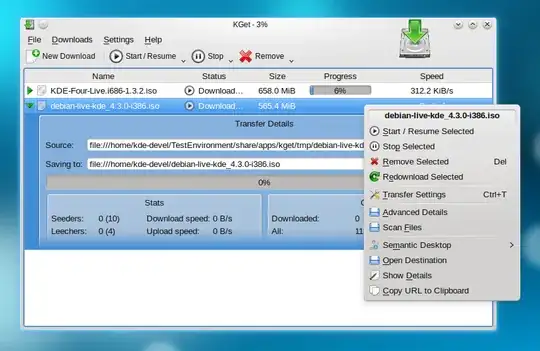
KGet is an awesome download manager. It's built for KDE, but supports HTTP[S], FTP, BitTorrent, MetaLink and combinations of all those things, as well as multi-threading, etc. It's cross-platform too.

DownThemAll! Firefox addon is great too.

Usually I use it. It doesn't support BitTorrent, though, but I use Transmission for that.

enter image description here

Zanna
  • 72,312
Shnatsel
  • 1,188
5

jDownloader

Pros

  • It can download from many file sharing site.
  • Its built-in link grabber makes it better at getting links.
  • It can be used to download from firefox with extension Flashgot
  • It has anti-capcha capability.
  • Fantastic resume capability.
  • Active team of developers

Cons

  • Developed in java and JVM is resource intensive some times. (same problem with Azureus or Vuze though in my opinion)
  • Complex GUI.

I used IDM on Windows long ago and I was missing a downloader like IDM and found jDownloader. you will need some time to get used to jDownloader

I have downloaded files greater than 2-3 GB with many disconnections (due to network problem) but the MD5 was exact !

Rahul Virpara
  • 11,860
5

Unfortunately IDM is not available for Ubuntu/Linux but there are many utilities are available which can give you fastest speed like wget and Axel are powerful download utilities.

to install it

sudo apt-get install wget axel 

you may get confused how to use them in easy way. I have a nice technique which I usually do.

Type in terminal

Wget -c  '<link>'.

axel '<Link>'

Here link can be retrieved from firefox's download window .Begin Downloading any file from firefox . It will appear in firefox download box. Pause the download process. Right click on downloading file. Choose "Copy Link location"

Paste it in terminal in place of link. Here note that you should not missed single quote. If you want to stop then press CTRL+C best thing is that your download would never be corrupted and you can resume it by pressing Up key and enter( command again).

atenz
  • 12,858
KK Patel
  • 19,753
5

Firefox extension DownThemAll with parallel download and resume support.

Zanna
  • 72,312
totti
  • 6,908
  • 4
  • 40
  • 48
5

I use Uget. Its a simple downloader, and supports resuming. THe latest version of uGet ie v1.8.0 also supports torrents. when you run uGet, it also does very well to detect the presence of a filepath in the clipboard, and asks if you want to start downloading.

enter image description here

theTuxRacer
  • 16,533
5

That product appears to be snakeoil. A download is a download; there is no magical incantation to make it go "5 times faster". The partial exception to this is when you are downloading from a site with multiple mirrors, then you can download from all of them simultaneously like the program axel does. This really only helps though if you have unlimited bandwidth and the mirrors are the bottleneck, and this is rarely the case.

psusi
  • 38,031
5

While I agree that this is complete nonsense (most sites don't trickle their connections to limit per-connection bandwidth caps, these days), of course there are download managers.

Possibly the most popular cross-platform application is DownloadThemAll!. It's a plugin for Firefox.

Oli
  • 299,380
4

Hello from the uGet project team,

I would suggest uGet.

uGet is one of the most powerful download managers for Linux while still being very lightweight. Our latest version was released 10 days ago. (Sep. 9th, 2012)

Steadyflow is a great program but is very limited in features as it was designed to be because of being for minimalists.

JDownloader is Java based so it is not going to be the best when it comes to resource management.

MultiGet had potential but its current version is an Alpha stage and has not been updated since 2010.

Zanna
  • 72,312
4

Flareget

Is the most Versatile Download Manager I found.

It is having all most all the features of popular download managers like IDM or DAP

* Batch Download * Browser Integration * Scheduled Download

* Flash Video Downloading

All those features are there.

enter image description here

Installation:

  • Latest release can be downloaded from flareget.com

  • Upto Ubuntu 13.10: can be installed with following commands;

For 32 bit:

cd ~/Downloads && sudo wget -c "http://www.flareget.com/files/flareget/debs/i386/flareget_2.3-24_i386(stable)_deb.tar.gz" && tar xzvf 'flareget_2.3-24_i386(stable)_deb.tar.gz' && cd 'flareget_2.3-24_i386(stable)_deb' &&  sudo dpkg -i flareget_2.3-24_i386.deb 

For 64 bit:

cd ~/Downloads && sudo wget -c "http://www.flareget.com/files/flareget/debs/amd64/flareget_2.3-24_amd64(stable)_deb.tar.gz" && tar xzvf 'flareget_2.3-24_amd64(stable)_deb.tar.gz' && cd 'flareget_2.3-24_amd64(stable)_deb' &&  sudo dpkg -i flareget_2.3-24_amd64.deb
4

I use jdownloader. It's a very good download manager which even supports various one click file hosters like rapidshare, fileserve etc.

You can download it from here.

Zanna
  • 72,312
Vijay
  • 1,745
4

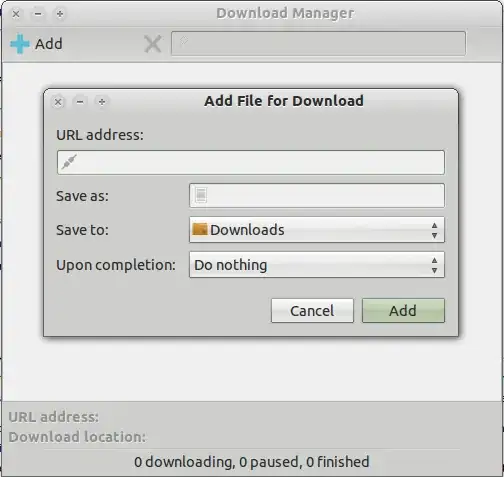
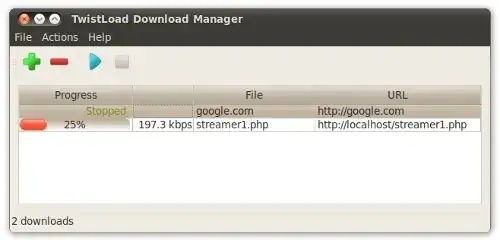
I humbly recommend TwistLoad for managing downloads. The program provides the core functionality you would expect in a download manager: automatically following redirects, cross-session interrupt / resume support, and a nice GUI interface to keep track of everything:

You can download TwistLoad from my PPA here.

Disclaimer: I am the author.

Zanna
  • 72,312
Nathan Osman
  • 32,495
4

I think that JDownloader can do everything that you want:

Bruno Pereira
  • 74,715
amfcosta
  • 769
3

You can use axel download manager. It is a command line tool but It support downloading files part by part, which is a popular method of accelerated download. The manual page of axel is saying this:

Axel is a program that downloads a file from a FTP or HTTP server through multiple connection, each connection downloads its own part of the file.

source: manual page for Axel

You can also explicitly mention the number of part it should do to accelerate download. The options of axel is as follows:

Usage: axel [options] url1 [url2] [url...]

--max-speed=x       -s x    Specify maximum speed (bytes per second)
--num-connections=x -n x    Specify maximum number of connections
--output=f      -o f    Specify local output file
--search[=x]        -S [x]  Search for mirrors and download from x servers
--header=x      -H x    Add header string
--user-agent=x      -U x    Set user agent
--no-proxy      -N  Just don't use any proxy server
--quiet         -q  Leave stdout alone
--verbose       -v  More status information
--alternate     -a  Alternate progress indicator
--help          -h  This information
--version       -V  Version information

Try this download manager. You'll be satisfied with this.

I want a perfect alternative of Orbit Downloader or Internet Download Manager of Windows

This can be a perfect replacement of Internet Download Manager. I tried downloading same file using wget and axel. The speed in axel outperforms wget very easily.

What I recommend from the three: If you want me to select a download manager from your list in the question, I would select JDownloader for it's feature richness. Though It requires Java to be run.

Anwar
  • 77,855
3

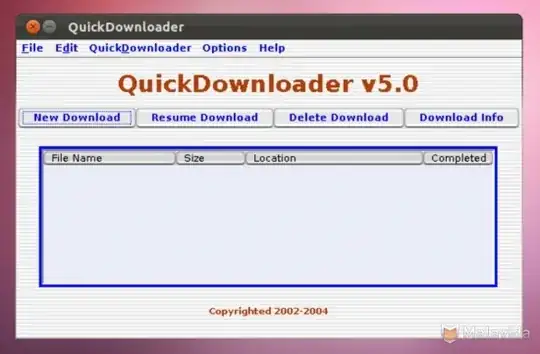
I would recommend QuickDownloader.

QuickDownloader is a download manager that accelerates downloads by between 200-300%.

It provides a resume capability for resuming broken downloads. It supports both HTTP and FTP downloads.

Here are some key features of QuickDownloader:

  • Support for multiple Downloads
  • System Integrity Checkers which ensure that all system critical
  • components exists and are in the correct location
  • Memory use reduced to between 2-4mb
  • Capability to carry out both downloads and Resume simultaneously
  • Extensive Decoupling of Code to reduce dependencies between code which could cause problem in future
  • Better Handling of errors
  • Information on each Download that can be resumed
  • Buffer Resizing for optimum use
  • Proxy Configuration for systems behind firewalls
  • Support for all types of Network connections such as Dial Up, Broadband T1 etc.
  • Ability to download from both HTTP and FTP sites
  • 100 % Resume support on all downloads even if the server doesn't support it.
  • Uses Java JRE which runs on any machine such as Windows 2000, 98, Linux etc. 1

To download Click Here

1Source:Linux Softpedia

enter image description here

Suhaib
  • 4,171
Mitch
  • 109,787
3

You can try out flareGet ( a recently released download manager for linux). It is multi-threaded and supports upto 16 segments per download for download acceleration. It supports browser integration for all the browsers - firefox, chrome, opera etc. http://flareget.com/download

enter image description here

3

While Uri Herrera had a very good explanation for what a download accelerator is, the solution that was pointed out, Gwget, is far from what he described as a download accelerator. Gwget is exactly what its name implies, a GUI on top of wget, the most basic of basic unix download program.

One of the reliable ways to get the job (acceleration) done is to download through multiple threads from a particular server. Some servers restrict download speed by threads, instead of the IP. In such cases, if a server limits your download to 100KB/s, having 6 thread will give you an upper bound of 600KB/s, a very significant boost.

So far the one linux program that does this is Multiget, it's a little bit of a pain to setup with firefox, however. But at least it's easy to install on Ubuntu. Google "Multiget deb" to download the debian package. Then look up on the Multiget documentation to see how to hook it up with flashgot. Good Luck

Cescante
  • 183
3

There are several download manager in Linux world but i preferred the following ones:

  • JDownloader: Most powerful download manager in Linux (in my opinion). Using it you can start, stop or pause downloads, set bandwith limitations, auto-extract archives and much more.
  • MultiGet: It is simple cross platform (Windows/Linux/BSDs/MacOS) download manager. It supports resuming downloads and SOCKS 4,4a,5 proxy, ftp proxy, http proxy. More information.
  • uGet: It is simple and lightweight and has several good feature like, "Resume downloads", "Queue downloads", "Firefox integration", "Clipboard monitoring" and more. - http://ugetdm.com
2

The best download managers for Ubuntu 12.04 are suggested above by other users since the IDM is not available for Ubuntu. If you are looking to download youtube or flash videos from any other sites you should install 'flashgot' add-on for Mozilla Firefox. You can get 'Flashgot add-on from the firefox add-on search page. For your information 'Flashgot' is also used as a site grabber like IDM. So you don't need to worry about not having IDM for your ubuntu. I use Uget download manager and Flashon add-on for Mozilla firefox which works pretty well.

2

You can try out flareGet (a recently released download manager for Linux). It is still in the beta stage but works pretty good. It is multi-threaded and supports up to 32 segments per download for download acceleration. For browser integration you can use flashgot.

wonder7
  • 21
2

If you are using Firefox you can use downthemall plugin also.

Zanna
  • 72,312
dedunu
  • 9,556
2

Aria2

Description: (copied from the website on Nov 2013)

aria2 is a light-weight multi-protocol & multi-source download utility operated in command-line. The supported protocols are HTTP(S), FTP, BitTorrent (DHT, PEX, MSE/PE), and Metalink.

aria2 can download a file from multiple sources/protocols and tries to utilize your maximum download bandwidth. It supports downloading a file from HTTP(S)/FTP and BitTorrent at the same time, while the data downloaded from HTTP(S)/FTP is uploaded to the BitTorrent swarm. Using Metalink's chunk checksums, aria2 automatically validates chunks of data while downloading a file like BitTorrent.

There are other alternatives, such as wget and curl, but aria2 has two distinctive features: (1) aria2 can download a file from several URIs(HTTP(S)/FTP/BitTorrent) and (2) If you give aria2 a list of URIs, aria2 downloads them concurrently. You don't have to wait for the current download queue to finish one file at a time anymore. aria2 tries to utilize your maximum download bandwidth and downloads files quickly.

There are also some applications that have the ability to do segmented downloading. Typically these applications split a file up by the number of threads and download them in parallel and wait for all threads to finish. In other words, they don't split unfinished segments adaptively. Normally, if things go well, this strategy works well, but if one thread is very slow (i.e. one of the server is very slow), then you have to wait for it to finish. aria2 can cope with this peculiar situation. aria2 can split segments adaptively all the way down to 1MiB. So you don't have to worry about the above problem. But you might complain: if a slow server is downloading at 1MiB, then one has to wait for that none the less. The answer is "no". Even in such a case, aria2 does the job quite well: aria2 cancels slow servers and use the faster server to finish the download. In other words, aria2 is very clever and reliable in many situations.

Unlike the original Aria, which has a GTK+ interface, aria2 provides only a command-line interface. And as a result, it has lower resource requirement. The physical memory usage is typically 4MiB (normal HTTP/FTP downloads) to 9MiB (BitTorrent downloads). CPU usage in BitTorrent with download speed of 2.8MiB/sec is around 6%.

Zanna
  • 72,312
2

wget is not a download manager, it is a download utility. By default you cannot do these things

  • You can't pause downloads
  • You can't view history
  • You can't schedule downloads
  • You can't download multiple files at the same time
  • You can't download multiple files from 2 different URLs
  • You can't restart downloads

When you have all these things in one utility, then you're allowed to call it a manager. For example Calibre is an ebook manager. Just because Adobe reader reads PDF, it doesn't make it a manager. Wget is no better than Curl for downloading stuff, hell I find Curl much more useful, at least you can use it in programming.

Some geek might leave a comment, you can do all that if you edit .bashrc or write a bash command or something. A download manager should do all these things easily and by default. I could browse the web in Emacs, if I download a plugin or write a script, that does not make Emacs itself a web browser.

To answer the question, I personally use Uget, but many people mentioned it so I'll mention pyLoad which is another great downloader.

Zanna
  • 72,312
Lynob
  • 6,775
2

I use aria2 which is a terminal based download manager utility. If you like UI then go for uGet.

This article might help you decide which one to install and help with installation.

Zanna
  • 72,312
Koushik
  • 11
2

One download manager available you might want to take a look at is Steadyflow Download Manager. Steadyflow works as a Unity indicator applet so to speak.

  • A basic GNOME download manager, supporting all URL protocols known by GIO/GVFS. This includes, among others, HTTP, HTTPS, FTP and SMB.

  • Pausing, resuming, and restarting downloads upon application restart.

  • An application indicator, or a notification area icon for platforms without Ayatana libraries.

  • An instant search/filter box.

  • Ability to add downloads via the command line and D-Bus, for browser extension writers.

  • Notification bubbles upon starting and finishing downloads (can be disabled).

To get Steadyflow, open a terminal (CTRL+ALT+T) and issue the following comands:

sudo add-apt-repository ppa:sikon/steadyflow
sudo apt-get update
sudo apt-get install steadyflow
Zanna
  • 72,312
Kory Wnuk
  • 1,521
2

Polipo is a local proxy that will sit between your browser and the internet and manage the connections. It is bundled with Tor setups as a way of avoiding the use of a socks proxy but maybe it can be used to optimize your internet connection, if you are technically inclined. If you do use it, it will likely be useful to enable pipelining and proxy pipelining in the Firefox registry (about:config) which will allow multiple connection requests to the server. You can then try to increase the maximum number of requests to 10 or so.

daithib8
  • 3,361
2

You can use JDownloader.

It downloads almost from every sites, even from that that ask for captcha. It also boosts download speed if you rise "Max. Con." option.

PS: You can use this site to install JDownloader from a ppa and have unity integration

1

Xtreme Download Manager

This question will not get outdated very soon, but most of the answers here are outdated. Beside uGet, few other applications mentioned thereunder are still alive. The best these days is probably XDG.

It can get the download link for multimedia and download the file with multi-fragment acceleration.

FROM OFFICIAL WEBSITE
http://xdman.sourceforge.net/

https://sourceforge.net/projects/xdman/

"""" Features

*** Download any streaming video

XDM can download video and audio files from popular sites like YouTube, MySpaceTV, Google Video and many others. It is maybe the best way of downloading webpage embedded videos and such. "Download This Video" button pops up in most cases you are watching a video on the Internet. Just click on the button to start downloading clips.

enter image description here

*** Download 32 time faster (but you don't need that, let's be reasonable)

XDM can accelerate downloads by up to 32 times due to its intelligent dynamic file segmentation technology. XDM segments downloaded files dynamically during download process and reuses available connections without additional connect and login stages to achieve best acceleration performance.

enter image description here

**** Works with all browsers!

enter image description here

"""

for your ubuntu

Linux 64 bit:

$wget https://sourceforge.net/projects/xdman/files/xdm-2018-x64.tar.xz/download

Linux 32 bit:

$wget https://sourceforge.net/projects/xdman/files/xdm-2018-x86.tar.xz/download

$tar -xvf yourFile.xz

--------------------------------/

FROM README FILE:

Installation instruction

  1. Open terminal
  2. Switch to the directory where you have extracted tar compressed file, there should be a file named install.sh
  3. Execute the file as root. a. In Ubuntu/Mint/Elementary OS or other Debian based Linux, use: sudo ./install.sh

  4. If installation is successfull, you can start xdm from Start Menu or by typing xdman interminal as non root user

  5. To uninstall run /opt/xdman/uninstall.sh as root

--------------------------------/ NB :

Pre-requisites : None

    ENJOY  !!!
cipricus
  • 4,066
  • 4
  • 47
  • 106
1

You can install prozilla with this by opening a terminal and typing:

wget http://old-releases.ubuntu.com/ubuntu/pool/universe/p/prozilla/prozilla_1.3.6-9_i386.deb 
sudo dpkg -i prozilla_1.3.6-9_i386.deb 

I also like kget, uget and fatrat.

kget is pre-installed on kde-plasma but if you wanna get it with Ubuntu desktop then you can with

sudo apt-get install kget 

In the same way you can install uget and fatrat, for example

sudo apt-get install fatrat 
Zanna
  • 72,312
Raja G
  • 105,327
  • 107
  • 262
  • 331
1

Here's a review of Best 8 Download Managers/Accelerators for Linux

Prozilla, which is rated as No.1 there, also has a GUI although it doesn't look very modern:

ProzGUI can be installed by entering these commands:

sudo add-apt-repository ppa:alza/project
sudo apt-get update
sudo apt-get install prozgui

Prozilla + Zenity

Those who would like a GUI and a really really fast and powerful Download Accelerator such as Prozilla but don't like prozgui due to its very outdated looks, numerous small windows, etc., can simply use a basic zenity-powered script like this:

#!/bin/bash
URL=`zenity --title='URL to Download' --text='Please enter URL of the file to be downloaded to ~/Downloads' --entry`
xterm -fa "Ubuntu Mono:size=10" -title 'Prozilla Downloading...' -e "proz -r -f --no-search --directory-prefix=/home/$USER/Downloads "$URL"" &

Some options which can be added/modified:

-k=n              Use n connections instead of the default(4)
--no-search       Do a direct download (no ftpsearch)
--ftpsearch       Do a ftpsearch for faster mirrors
--min-size=n      If a file is smaller than 'n'Kb, don't search, just download it

Of course you need to install prozilla, zenity and xterm as below before running this script:

sudo add-apt-repository ppa:tahutek-team/prozilla
sudo apt-get update
sudo apt-get install prozilla xterm zenity

Further information about installing non-GUI version of Prozilla can be found here:

ProZilla Kaptain Launcher

And for those who would like a good-looking GUI launcher including more options:

Prozilla Kaptain Launcher
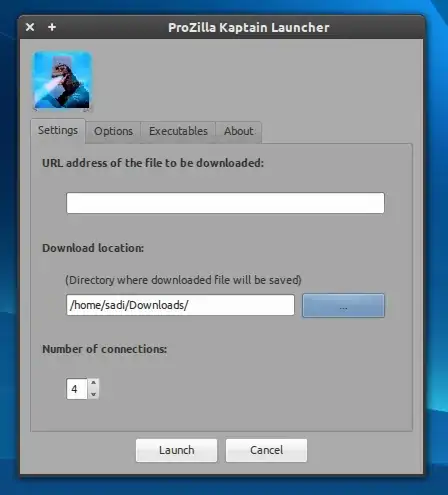
enter image description here

Zanna
  • 72,312
Sadi
  • 11,074
0

Most of the answers here are outdated. But not those about XDM and uGet. — With these two I don't need others, but one that is working fairly easily as I speak is worth mentioning: AWGG(aka Advanced Wget GUI)

Download the 0.6 version - the older ones are outdated - and run the executable — it's "portable". It is very similar to IDM of Windows, a lot of settings.

enter image description here

enter image description here

It states it has browser integration with the Download with Wget addon (for Firefox, here).

enter image description here

But I don't see that integration, as the context menu that addon brings will take the download to a terminal wget download (not the AWGG). The link (captured with other tool, probably XDM) can be copied and pasted (after selecting "+" New download), or can be dragged & dropped onto a "drop box" floating button. It doesn't have a "download" button like XDM and IDM, but has clipboard monitoring (just like uGet). Also, only aria2 tool if selected seems to provide multi-source download, and that limited to 5, which results in somewhat lower speeds than the competition aforementioned.

enter image description here

enter image description here

cipricus
  • 4,066
  • 4
  • 47
  • 106
0

Use prozgui

I know download accelerators use multi thread type processes to achieve faster download speeds and from this I just found the ninja download accelerator for Ubuntu.

Yesterday my download took about 4 hours and still not complete for 2 GB and then failed.

Now Today I am using prozgui which I just downloaded and then in the preferences I updated the connections limit to 10 threads, currently I am at 15% of the download in under 3 min this product is unbelievably fast (the best)

Prozgui allows you to select the number of connection threads which allows you to use your full connection without no limits. I now have 10 threads downloading my file

And by the time I finished writing this message the download is already at 40%

I am using Ubuntu 13.04 and it works perfectly fine

Zanna
  • 72,312
-1

uGet is a great solution and is the closest linux/ubuntu app to IDM available.

http://uget.visuex.com

Disclaimer: I may be a bit biased as I am a uGet project member.

-1

I like Flashget alot. Although it is only available for Windows but it runs fine with Wine and I use it for all my video/audio/torrent download tasks. You should give it a try. There are 2 versions of flashget available from their site. I would recommend that you use 1.9.6 instead of 3.3. Download speeds of both versions is same but 1.9.6 has a simple and less cluttered interface. You can install Wine with command

sudo apt-get install wine

After Wine is installed, download flashget196en.exe from flashget.com and install it. Then you can run Flashget from Wine programs.

binW
  • 13,194
-1

FlashGot firefox extension has an option to use DownThemAll Turbo (abbreviated to DTA Turbo there) as a downloader. It's a fastest Linux downloader I've ever used.

Adobe
  • 3,971
-2

Try Flashget with Wine. I have been using it on Windows and Ubuntu (with wine) and its an excellent application. If you decide to give it a try, I would suggest installing version 1.9.6

binW
  • 13,194