4

I have message (motd - message of the day) that there's some updates for my server.

Now, if I don't want simply to do what they told me (apt-get update, apt-get upgrade) and to have some control over the further update, what exactly should I do?

By having some control I mean:

  • to have exact list of packages to be downloaded and installed

  • to have ability to exclude some of them if I want so

1 Answers1

1

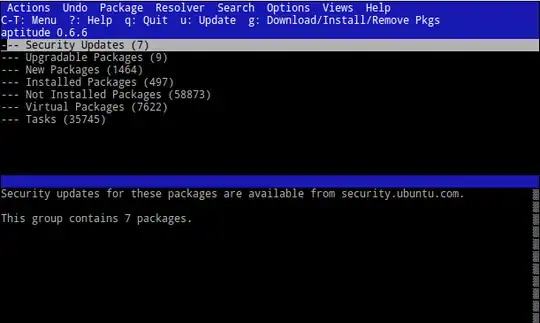
I'd suggest to use aptitude Install aptitude. It features a small semi-GUI for the terminal, with a nice way of selecting the packages you'd like to install. Here's a short how-to.

  1. Start Aptitude; note: provide no arguments.

    sudo aptitude
    

    enter image description here

    Optionally, press U to update the package list (same as sudo apt-get update).

  2. By default no packages are selected for upgrade. You could expand the group of packages by pressing Enter.

    • You'll need to press + to mark the package for installation (or upgrade in this case). You can select whole group by doing this while the group is selected.

    • Press = to mark it as the current situation (revert the selection above).

    • To uninstall a package, press -.

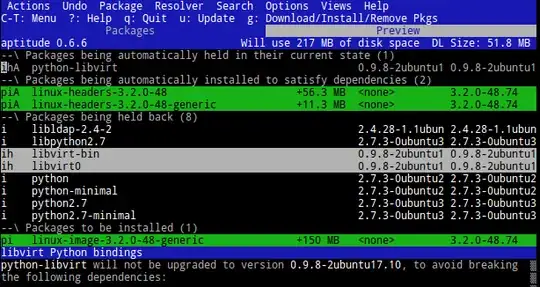
  3. Press G to go the the preview of the action about to take (notice this is in a new "tab"). In the example below I selected only the "Security Updates" - others are not upgraded.

    enter image description here

  4. Press G again to perform the operation, or Q to close the preview tab.

Please note that this is different from marking the packages as "on hold", it's just selective upgrading.

gertvdijk
  • 69,427