Is it possible to put a shortcut to a file (like a application launcher but opens a file instead of launching a program) in the Unity launcher, and if so, how?
Asked
Active
Viewed 1,971 times

1 Answers
6
I only know a dirty way:
- Create a file
~/.local/share/applications/myfile.desktop Add the following to that file:
[Desktop Entry]
Name=MyFile
Exec=gedit /path/to/a/text/file
Icon=text
Terminal=false
Type=Application
StartupNotify=true
Save it and make that file executable:
chmod +x ~/.local/share/applications/myfile.desktopNow browse to that file in Nautilus and drag it to the launcher.
This will add a launcher with a text icon, that opens /path/to/a/text/file with gedit:
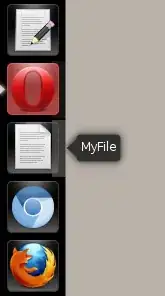
Of course you need to change application/file/icon to whatever you want.

htorque
- 66,086