I just installed the latest Ubuntu and then enabled the restricted drivers for NVIDIA
Once I rebooted, the system starts but then enters some kind of graphical test pattern loop
(Blue, Black, White, Grey, and finally all colours in horizontal bars)
At this point the system does not respond to any key combinations or mouse input. Rebooting the system multiple times does not help either.
Update:
Just found this post: Ubuntu 13.04 - installation Nvidia driver
The difference being that I cannot even get into a terminal with CTRL+ALT+F1
Update 2:
By booting in recovery mode in a root shell I was able to remove the driver and then follow the instructions from the other post. Same coloured screens as a result.


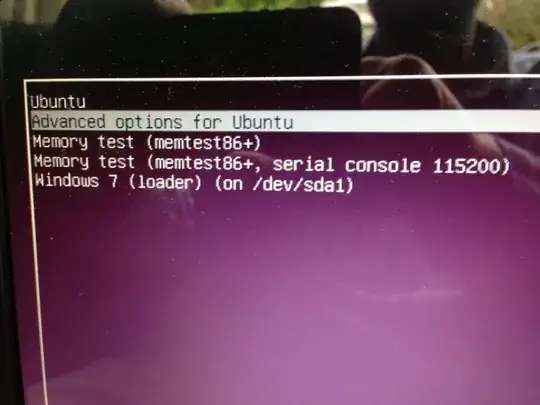 move the mouse cursor down to the Ubuntu Advanced options section of the menu. Click on the second
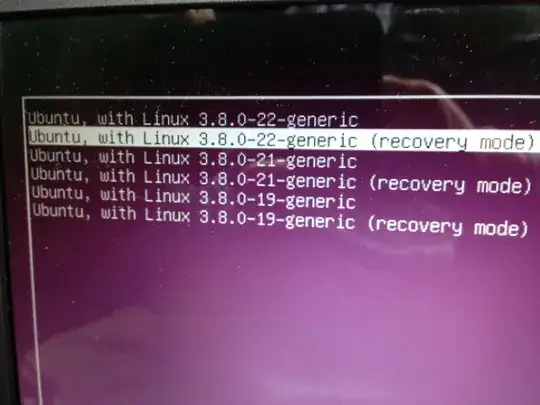
At the Next Screen, choose the following option:
move the mouse cursor down to the Ubuntu Advanced options section of the menu. Click on the second
At the Next Screen, choose the following option:
 And finally on the third screen click on the following option:
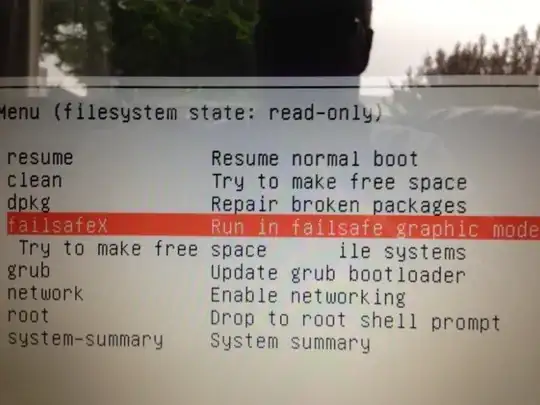 This should allow you to boot up and adjust your screen resolution.