48

(Ubuntu 13.04 with GNOME Shell, upgraded, GNOME version 3.8)

Recently, I upgraded Ubuntu to 13.04. the default desktop is gnome-shell.

Except Nautilus, other software border doesn't disappear when I make them to be maximized. I checked the problem for these software:

  • LibreOffice
  • Firefox
  • Rhythmbox
  • thunderbird
  • GNOME-Terminal

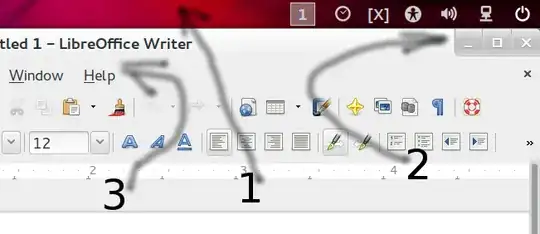
On the other hand there are three bars on maximized mode:

  1. GNOME Shell panel

  2. Title-bar for software which contains - + x (minimise, maximise, close) buttons.

  3. Software menu-bar

    Number "2" is extra. Is a package missing?

pomsky
  • 70,557
mini
  • 2,385

9 Answers9

60

There's a much easier way than editing config files - simply add Pixel saver extension to get rid of the title bar and reclaim your screen space.

It has the added benefit that you still get maximise/minimise buttons but these are now stowed away in the top panel.

I previously used Maximus but this seemed to break with gnome 3.8 - Maximus also use to give me issues with pop-up calendars for my bank but this extension play nicely with that too.

Robbie C
  • 659
25

A quick and simple fix for this can be found on webupd8. To test this quickly without much work, just launch:

gnomesu gedit /usr/share/themes/Adwaita/metacity-1/metacity-theme-3.xml

Now find this next line, Ctrl+f to search, you want to be sure it is the line that reads name=max:

frame_geometry name="max"

change that so it looks like this:

frame_geometry name="max" has_title="false" 

Now restart the shell to view the changes, Alt+F2, type r, and Enter/Return.

To further customize this you should examine the above webupd8 article and make your changes carefully, or paste the entire contents of the frame_geometry style including everything between:

<frame_geometry name="max"...> ... </frame_geometry>

As you will see with the above edit, the entire title bar isn't gone, a small portion remains. But I did not make the other changes and the contents of that stylesheet differ between shell versions, read below for another change I tested. I am also running 3.8 though, so I went ahead and did some testing and I made one more change under frame_geometry=max I changed the following value from 8 to 0:

<distance name="title_vertical_pad" value="0"/>

You'll notice the difference now, and there's still a bit of a shadow left over, but it actually looks pretty good to me.

David Foerster
  • 36,890
  • 56
  • 97
  • 151
l300lvl
  • 1,192
18

Update from 2018: pixel-saver is pretty much abandoned project, as mentioned here

It also has a lot of open issues, like this.

But fortunatelly, we can install no-title-bar which works great and seems more active.

5

Even though it sounds tempting to use a GNOME extension for this purpose, it seems to me like this is not the most elegant way. After all, it's a change to the window decorations, hence it should be covered by the window theme.

However, changing the global Adwaita theme in /usr/share/themes isn't any better, because your package manager will overwrite changes with every update. Because of that, I used to have a copy of the Adwaita metacity theme with the necessary changes described in the above answers. Whenever there was an update to gnome-themes-standard I used to update my custom theme by applying a patch file (https://gist.github.com/ajashton/1258443) to the Adwaita metacity theme.

But patch would soon complain about changed line numbers (due to the updates by the GNOME devs). So I decided to write down the necessary changes in an XSLT script that would be almost completely resistant to future changes by the GNOME devs:

https://gist.github.com/tuxor1337/74e76d3d153c67593454

thomas
  • 151
2

Just for update: current solution would be to install maximus extension. It's author already fixed it for Gnome 3.8 - there's a mini how-to in franz91's comment.

cprn
  • 1,209
1

The previous extensions seams to be abandoned or no more compatible, I've found this extension https://extensions.gnome.org/extension/4630/no-titlebar-when-maximized/ that do the job.

0

In reference to the answers by

the 'No Title Bar' extension (a more featureful fork of 'Pixel Saver'), is now seems abandoned too; with the last officially supported GNOME Shell version being 3.30. Thus 'No Title Bar' would probably not work properly in recent Ubuntu versions, e.g. Ubuntu 20.04 LTS (Focal Fossa) which comes with GNOME Shell version 3.36.

An alternative extension (which is being maintained currently) for newer Ubuntu releases is No Title Bar - Forked by BebopxD.

No Title Bar removes the title bar from non-GTK applications and moves the window title and buttons to the top panel.

Titlebars are also hidden for Wayland-native clients that don't use CSD. Some of the options may be incompatible with this.

'No Title Bar - Forked' extension by BebopxD

P.S. Refer to this to learn about installing and managing GNOME Shell extensions: How do I install and manage GNOME Shell extensions?

pomsky
  • 70,557
0

For gnome shell <= 3.8 You can use Maximus, but it doesn't work on newer versions. For new gnome versions there's Maximus 2 right from the gnome extensions directory.

0

others already spoke about maximus, I will just put it differently (simpler):

  1. sudo apt install maximus it is currently version 0.4.14-3.
  2. start it on terminal maximus & disown. (can close terminal now.)
  3. add it at start-up applications for next boot.

Reviewing

maximus actually tries to maximize ALL windows it can, even windows that should never be maximized, and by having no command line options, we cant limit it to ONLY ALREADY MAXIMIZED windows (so that it would work its magick and ONLY remove the window title bar). So, I am disabling it now until I find something more fit to my needs.

obs.: ubuntu 16.04 here

PS.: why am I using metacity on Ubuntu?

my monitor is broken and I use nomachine on an old notebook, as the performance for games and videos is better on a 2D window manager than in a 3D one (in case that extra info is useful to someone else).

David Foerster
  • 36,890
  • 56
  • 97
  • 151