2

I installed Chromium, but can not select it as my default browser. Where does Ubuntu keep the list of applications shown in this menu?

I use Ubuntu 12.04 with Unity as my environment.

I also tried setting it with update-alternatives:

kait@frooops:applications$ update-alternatives --config x-www-browser
Es gibt 2 Auswahlmöglichkeiten für die Alternative x-www-browser (welche /usr/bin/x-www-browser bereitstellen).

  Auswahl      Pfad                       Priorität Status
------------------------------------------------------------
* 0            /usr/bin/chromium-browser   40        Auto-Modus
  1            /usr/bin/chromium-browser   40        manueller Modus
  2            /usr/bin/firefox            40        manueller Modus

But as you can see, it has no effect.
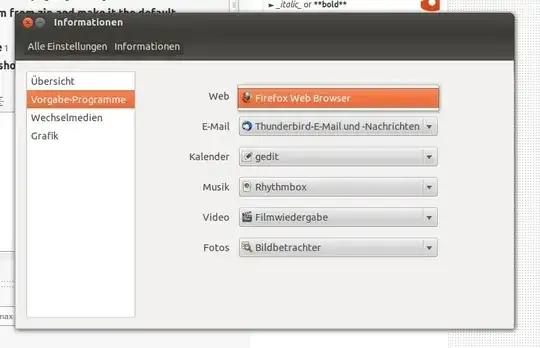
Can't select Chromium as default Browser

Kai
  • 121
  • 1
  • 4

2 Answers2

1

I had the same problem on linux mint. I wanted Google's chrome to be my default browser, but for some reason it did not listen to me. So I did this once and somehow everything got sorted:

  • Right click on a html file
  • Select Open with Chromium
  • Next Close the browser again
  • Repeat 1 and 2 but this time click on other options and select Make Chromium as default browser
  • user2147954
    • 121
    • 3
    1

    You can also change the default web browser by editing the appropriate file in gedit.

    1. Open the file browser, press Ctrl + H and browse to /home/YOUR-USERNAME/.local/share/applications/mimeapps.list

    2. Make a backup copy of the file called mimeapps.list, rename it to mimeapps.list.bak and save it in the same directory. You can rename mimeappps.list.bak to mimeappps.list to restore to your original settings.

    3. Open mimeapps.list for editing in gedit.

    4. There are four lines in mimeapps.list that need to be edited:

      After the line that says [Default Applications]

      x-scheme-handler/http=firefox.desktop  
      x-scheme-handler/https=firefox.desktop
      

      After the line that says [Added Associations]

      x-scheme-handler/http=firefox.desktop;  
      x-scheme-handler/https=firefox.desktop;  
      

      Edit these four lines so that after the editing they look like this:

      After the line that says [Default Applications]

      x-scheme-handler/http=chromium-browser.desktop    
      x-scheme-handler/https=chromium-browser.desktop  
      

      After the line that says [Added Associations]

      x-scheme-handler/http=firefox.desktop;chromium-browser.desktop;  
      x-scheme-handler/https=firefox.desktop;chromium-browser.desktop;  
      
    karel
    • 122,292
    • 133
    • 301
    • 332