7

edit: Thank you for reopening

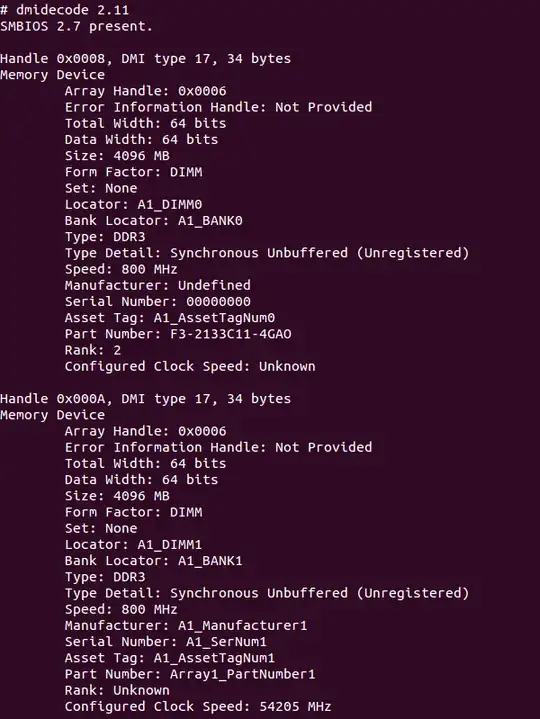
I have an an AMD APU as my CPU/GPU (specs below) and its graphical performance benefits greatly from higher speed RAM. In my motherboard BIOS I have set the memory clock speed to 2133MHz. However, when I check my RAM speed through the terminal with lshw and dmidecode --type 17 it shows my speeds as 800MHz.

Are lshw and dmidecode showing the wrong information? Can Ubuntu take advantage of my higher speed RAM at all?

Specs:

  • CPU: AMD A10-5800k
  • RAM: 8GB (2x4GB) G.Skill Ares @ 2133MHz
  • Mobo: Asrock FM2A85X-ITX

lshw results:
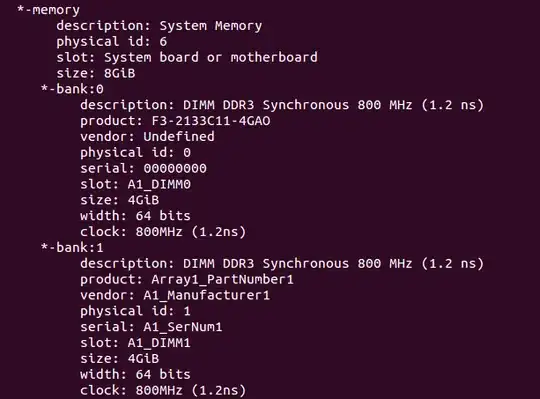
enter image description here

dmidecode results:

enter image description here

(running Ubuntu 12.10 and using AMDs 13.1 Catalyst drivers)

curiouscafe
  • 71
  • 1
  • 3

2 Answers2

6

First, memory has two read/write cycles per clock one. So you should multiply clock speed by two to get your memory speed. That means that lshw is reporting 1.600 Mhz.

Second according to AMD specs your CPU only supports DDR2 up to 1866 Mhz, so we are quite close to the real result. In the same specs you can see that your GPU speed is just 800 Mhz, what makes me wonder if the real bus speed of your CPU is 800 Mhz, that would explain your memory speed but not the 1866 number in the AMD speed.

I have found a review benchmarking your CPU and a similar memory. To be able to find any difference they needed to overclock the GPU.

So unless you overclock your GPU, your new memory is not going to make any difference.

Javier Rivera
  • 35,434
2

I realize this is an old post however, dmidecode doesn't report the actual RAM speed or its overclocked setting, it reports whatever is hardcoded in the ram chips themselves. If the ram is coded at 1600, dmidecode generally calls out 800mhz as others mentioned 800x2=1600. If you OC'd it to 2133 in your BIOS then you can rest assured it is OC'd to 2133 (your bios splash should report it during boot if its enabled). The GSkill ram chips you bought are baseline 1600 and that is what is hardcoded in them as reported by dmidecode, along with the other info that dmidecode collects from the chip itself. No doubt if you run memtest86 you will see the speed set at 2133mHz. dmidecode is a useful tool but not for checking actual ram speed.

BillV
  • 61