I learned about the PDF possibility of taking notes which are then stored with the document, usefull when reading ebooks. If the note taker also supports some math notation, that would be wonderful! Which free PDF reader can do this? (I am using Lubuntu 12.10)
Asked
Active
Viewed 5.8k times


11 Answers
26
I suggest you try these two programs and choose the one that better fits your needs.
Xournal
sudo apt-get install xournal
All annotations are hand made (so to speak). You can print them on the PDF, if you want, or you can set them apart.

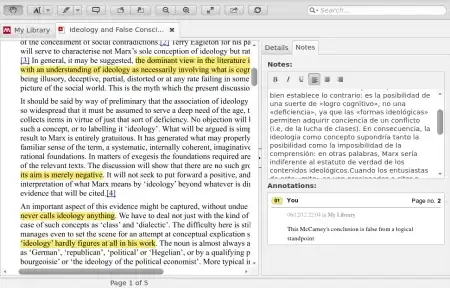
Mendeley
Download from here. Very useful to keep track of your research notes.

Ed Villegas
- 3,543
22
Evince 3.6.1 (the default PDF viewer) now supports adding annotations and bookmarks (proper PDF bookmarks), that are saved with the document.
Since Evince 3.14 you can add and delete annotations.
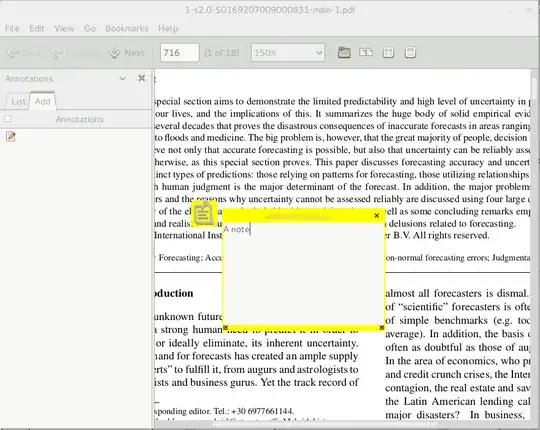
UPDATE Evince 3.14: Annotations can be added and deleted.
UPDATE 2020: Key S adds a text note and Ctrl + H highlights selected text. (both still require a mouse click to start writing on the annotation). Thanks @Gogowitsch

alfC
- 3,584
6
You could also try Okular. Now you can actually export annotations to PDFs in Okular (this was not possible until recently): http://docs.kde.org/stable/en/kdegraphics/okular/annotations.html
It seems Okular has to be built with Poppler at least version 0.20. It works with Ubuntu 13.04.
Update:
The version of Okular (0.19.3) found in at least Ubuntu 14.04 now also supports customising the review toolbar (the toolbar for adding annotations) by adding and modifying the various annotation types that can be selected.

Thomas Arildsen
- 528
5
Xournal  would be worth taking a look at. Annotations and modifications are stored in a separate file but can be easily exported to PDF.
I don't think there's any PDF editor out there that supports any kind of sophisticated math notation, but I might be mistaken.


Glutanimate
- 21,763
3
PDF-X-Change Viewer is fairly good. You have to run it under Wine, though.
You can read up on it here: Finally, real PDF annotating under Linux! (with help from Wine)
Or you could look at pdfedit
.

2
There is yet another alternative. You can install Adobe Reader. The latest linux version is 9.5.5 (which is dated compared to W$ and Mac versions). It allows for editing and commenting. You do have to enable the editing and commenting toolbars (right click on the toolbar and select).
sudo apt-get install adobereader-enu
sudo apt-get -f install # needed because there is a wrong dependency
For doing proofreading when working with a publisher this is the way to go.

don.joey
- 29,392
2
Our company, Qoppa Software publishes a free advanced PDF viewer for Linux. It can render many PDF features including annotations, form fields, layers. PDF Studio Viewer has advanced printing options, and other UI features such as loupe tool, pan & zoom, rulers & grid, etc. There are navigation panes such as thumbnails, comments, digital signatures, bookmarks, etc .. And the application is easy to install with no dependencies. The installer comes as a single file. https://www.qoppa.com/pdfstudioviewer/

Glorfindel
- 975
- 3
- 15
- 21

1
I'm a huge fan of Master PDF Editor, which is free for non-commercial use (home, education). Features include:
- Comment and annotate PDF documents
- Add and/or edit bookmarks in PDF files
- Edit PDF text and images
- Create and fill PDF forms
- Split and merge PDF documents
- Create new PDF document from scanner or existing file(s)

bmaupin
- 5,371
0
You could give Polar Bookshelf a look.
Then note style is similar to Mendeley, where notes are shown collected in a sidebar. It also copies out highlighted text. For math, it has the very handy feature that you can drag a "highlight box" around content, with the content then shown in the list of notes.
Note that Polar stores notes etc. in a database, currently with no options to share them, and not embed option.

Rasmus
- 8,655
0
For anyone who found this question, my suggestion is to use:
Foxit PDF Reader
installation link: https://www.linuxbabe.com/desktop-linux/install-foxit-pdf-reader-ubuntu
In my opinion it is a more powerful PDF reader than any mentioned in this post. Its advantages include, but are not limited to:
- user friendly interface
- easy customization
- comparable features/functions to Adobe Acrobat Reader
And the most important is that it is available cross systems: Windows, Mac and Linux.
Try it out, I believe you will find amazing!

