1

I had to reinstall Ubuntu 12.04 on my desktop pc after something went awry while trying to update to 12.10.

Before reinstalling, my clock had the following format: Wed 13:21:

Wed 13:21

And now, this is what I see: 13:21 2012-12-19, Wednesdsay:

13:21 2012-12-19, Wednesdsay

I can't for the life of me remember how to fix it, plus I don't think I did anything different from my previous install. If I disable the show-date function either from terminal or gnome tweak tool, all I see is the time. What I'd like it to show would simply be Day and Time, like in the first pic.

Can anyone help?

user98085
  • 1,611

2 Answers2

0

When you say, "Gnome shell clock", I presume that you do not mean Unity's version?

This is what I have on file. Please try it and let us know whether or not it works for you.

You need gconf-editor ("Configuration Editor") installed; if not, please install it first; you can do this from Ubuntu Software Centre.

  • Open gconf-editor > apps > panel > applets > clock_screen0 > prefs ("clock_screen0" may have a slightly different name).
  • format > custom
  • custom_format > %a %H:%M

The date format is the same as described in the date manual (open a terminal and enter man date).

The format can also include limited text formatting such as <span …> and <sup>. Use %n for a newline. Here is an example:

<sup><span rise="1000" font_desc="Droid Sans 6.5" color="#878787" weight="normal">%a %d %b</span></sup>%n<sub><span rise="6000" font_desc="Droid Sans 7.5" color="#878787" weight="bold">%I:%M %p</span></sub>
Paddy Landau
  • 4,658
0

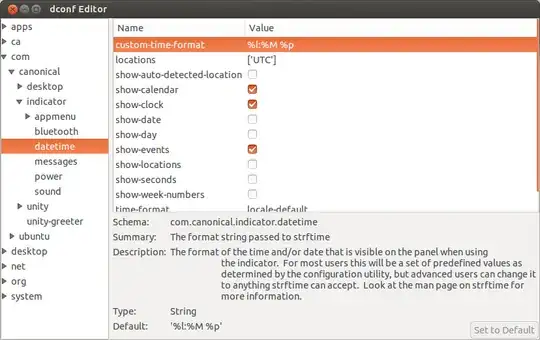
Look in D-Conf editor. com > canonical > appmenu > datetime enter image description here

Install Dconf

wojox
  • 11,840