I was on Facebook when Firefox asked me if I want to install facebook for "extra features" and I clicked "install" but now I want it gone. I can't seem to find any remove option in Software Center nor Firefox.
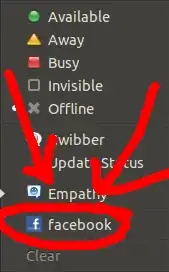
I've managed to remove facebook entry from the messaging menu by deleting "facebook.desktop" from
~/.local/share/applications

If you have any online accounts setup this could also be what your seeing.
Check System Settings -> Online Accounts and delete your facebook account.

Best possible answer would be following this.
I followed the easier way (using Ubuntu Software Center), then I did the harder way (using dconf-editor), exited Facebook then went on it again. Now the facebook menu on the launcher no longer appears.

