85

Possible Duplicate:
How to format a USB flash drive?
How do I clear everything (data, viruses) from a thumbdrive?

How to format a pen drive in Ubuntu?
I have this pen drive which I made bootable using some other system (OS).
But I need to format it from my Ubuntu 12.04. Please guide me.

Vipin Verma
  • 5,524
  • 15
  • 45
  • 64

2 Answers2

145

Method #1 (The Graphical Way)

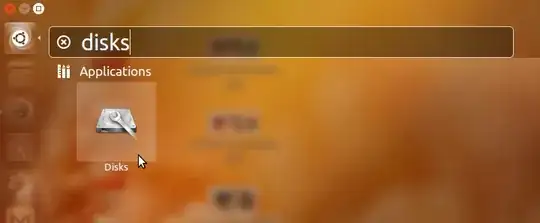
Open Disks program from dash:
enter image description here

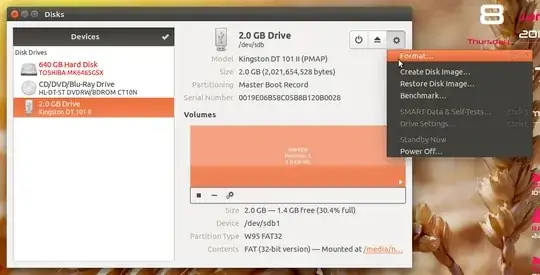
Then choose your device from left. Make sure you have selected at least one volume, and click on format as below:
enter image description here


Method #2 (The Command-Line Way)

In case you can't get your device formatted from Method #1 try this way.

  1. Open the Terminal (Ctrl + Alt + T)

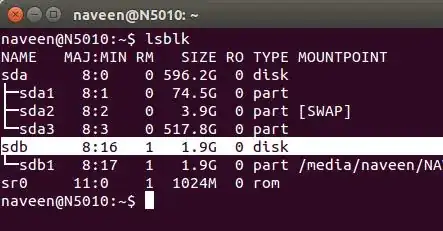
  2. List your block storage devices by issuing the command lsblk
    Then identify your pen drive by it's SIZE. In my case its /dev/sdb
    enter image description here

  3. Erase everything in the pen drive (OPTIONAL):

    sudo dd if=/dev/zero of=/dev/sdb bs=4k && sync  
    

    Replace /dev/sdb with your corresponding device. This will take some time. It will pretend to stuck. Just be patient.

  4. Make a new partition table in the device:

    sudo fdisk /dev/sdb
    
    • Then press letter o to create a new empty DOS partition table.
  5. Make a new partition:

    • Press letter n to add a new partition. You will be prompted for the size of the partition. Making a primary partition when prompted, if you are not sure.

    • Then press letter w to write table to disk and exit.

  6. Format your new partition.

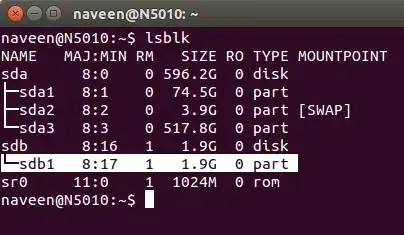
    • See what is your new partition with a command lsblk
      In my case it is /dev/sdb1
    enter image description here

    • Issue the command below to format the new volume:

      sudo mkfs.vfat /dev/sdb1  
      

      Please replace /dev/sdb1 with your corresponding device.

    • Eject the device:

       sudo eject /dev/sdb
      
muru
  • 207,228
Naveen
  • 9,551
6

You can try the application called Disks Utility. It's a very handy utility which should let you format the disk, among other things. You can find it by pressing ALT + F2 and typing the name, or going to System > Administration, or I guess typing the name in unity dash.

Zanna
  • 72,312
Karthik T
  • 2,116