3

I'm interested to benchmark a console-mode application, and would like to reduce to a minimum any interferences from other processes in the system.

Is there an easy way to boot into Ubuntu 12.04 in a "bare-metal" mode ? I'm still interested in casually booting a "desktop" version of Ubuntu (so will prefer to avoid permanent changes), and would like to avoid installing a separate Ubuntu-server version.

My use-case is the following -

  1. Application is single-thread and console-mode only.
  2. Test-box has 12GB of memory.
  3. I ssh into the test-box.

Seems I can skip at least Unity, X-server and their dependents.

3 Answers3

3

Booting into single-user mode will keep most of the services (including X) off, and bringing up the network and sshd services should be enough to make it usable for your purposes.

1

As long as other things aren't actively doing any work, there should be no interference problems. If you don't log in to an X session, and only log in via SSH, then there shouldn't really be any actual work happening, in general. You could telinit to the console-only runlevel, or simply reboot into the "recovery mode" selection from the boot prompt, to have fewer processes running.

Though, it doesn't really matter if other things are running, so long as nothing is consuming all the CPU resources, or hitting the disk constantly, which may cause your program to stall in IOWait.

dobey
  • 41,650
1

As long as you can trust yourself to not mess things up while logged in as root, the best way to get a minimal system with networking and SSH is:

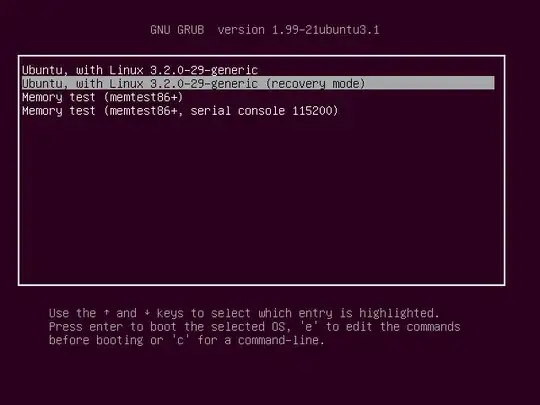
  1. Boot into recovery mode from Grub (hold Shift down when booting to get the menu)

    enter image description here

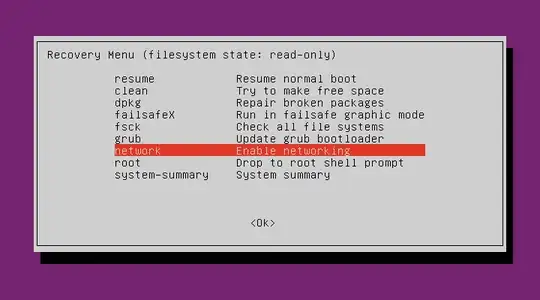
  2. Enable networking (which will also remount your partitions in normal read/write mode)

    enter image description here

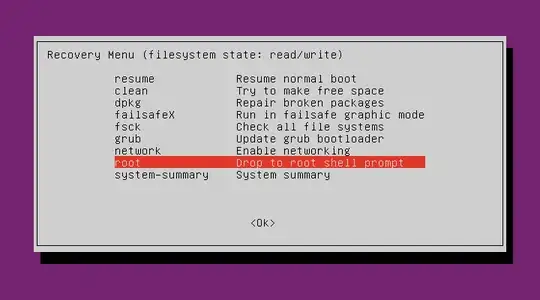
  3. Drop to a root shell (aka single-user mode):

    enter image description here

  4. Do a service ssh start to enable SSH and you're good to go!

Note: you can always give your benchmark program realtime CPU and I/O priority using nice and ionice; e.g. maxing out both would be:

nice --20 ionice -c 1 /path/to/program
ish
  • 141,990