1

Possible Duplicate:
How can I install Ubuntu without removing Windows?

I am planning on installing Ubuntu 12 on top of Windows 7 as a dual-bootable system. I have completely emptied the E:// drive, equaling to almost 80 GB of free space. I want to install Ubuntu on this drive (thus leaving only the C:// and F:// drives for Windows). With reference to this article, can anyone tell me which stage would let me choose the E:// drive as the space where I want to install Ubuntu?

2 Answers2

1

Note: When dealing with partitions, always make sure that you have a full backup of your system just to be on the safe side.

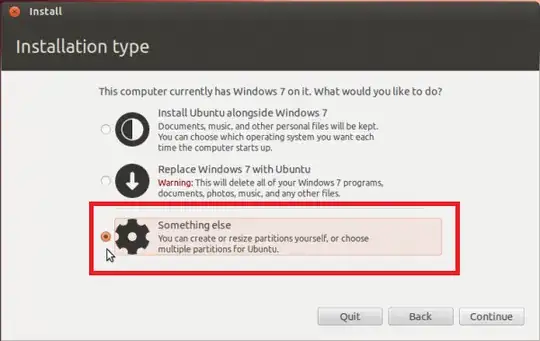
Because you will be choosing/creating partitions manually, the option you want to select is Something else. It starts at the Installation Type screen, and goes through choosing and/or editing the partition. Make sure that you choose the right partition.

Choose this First

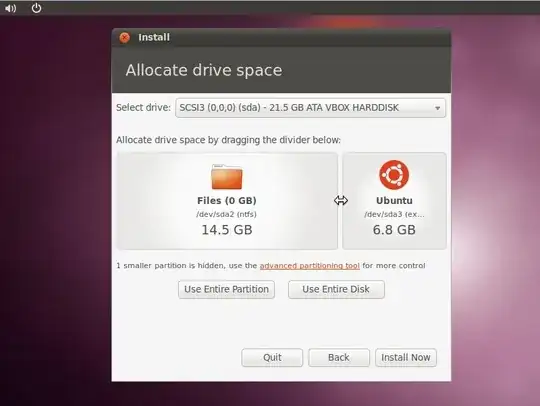
According to the link that you included in your question, it would be the second Installation Type screen, where it lists all the available partitions.

Choose this Second

Keep in mind that the partition will not be labled as E:/ but as sd(x), where (x) is the partition number, and it will show empty next to it.

Note: Since you already have free unallocated space on the hard drive, you do not have to go through this partition resizing process.

Images compliments of linuxbsdos.com

Mitch
  • 109,787
1

See this answer: https://askubuntu.com/a/92066/5538

Choose Install ubuntu alongside windows.

Image in step #5 shows that you can select the drive.

It won't be labeled as "E:", but if you know the type and size of your disk/partition, you can surely identify it.

There might be an option to choose "Entire partition" or "Entire disk", as seen here: https://askubuntu.com/a/92066/5538

ubuntu install ubuntu alongside windows -- entire partition or entire disk