I remember that Ubuntu with GNOME 2.3 had an awesome app called docky.
I much prefer the Unity desktop, so I'm just asking if there's any way to make a stack docklet like this in this screenshot.

You can try using Cairo Dock 3.0 in your system. It works fine and is comfortable to use.
You can install it using the following commands:
sudo add-apt-repository ppa:cairo-dock-team/ppa
sudo apt-get update
sudo apt-get install cairo-dock cairo-dock-plug-ins
It maintains the naturalism of Unity along with the convenience of a proper dock.
You can use avant-window-navigator. It has a stack plugin in the applet window.
The terminal command is:
sudo apt-get install avant-window-navigator
Here is a good tutorial about using avant-window-navigator.
Here is a picture of stack applet
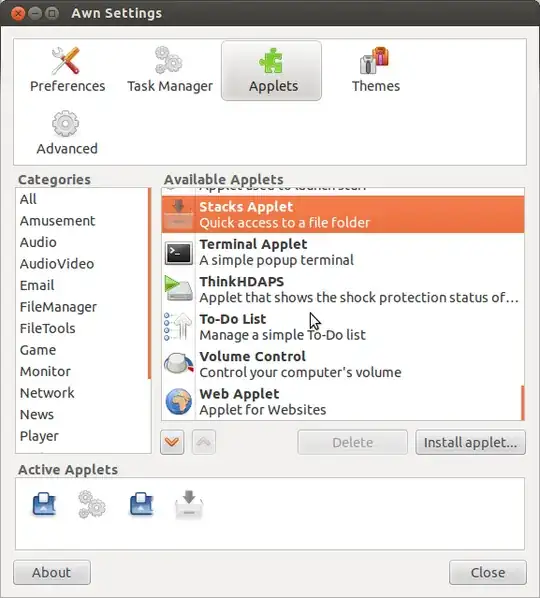
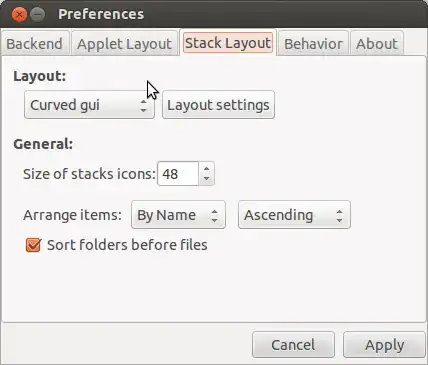
After you added the applet, right click on the stack applet icon, and select "Preferences". In the "Stack layout" tab, select curged-gui option.
For adding anything on the stack, Press CTRL+ALT+SHIFT after selecting the item and drag and drop it in the stack.


Cairo-Dock's Stack applet lets you stack files, folders and URL. Simply drop anything inside the dock and it will be automatically added to the Stack


