So, i was following this guide:
https://ubuntuhandbook.org/index.php/2021/08/enable-hibernate-ubuntu-21-10/
and everything seemed to go perfect.
But when trying to manually hibernate with the command sudo systemctl hibernate, i received the following message from terminal:
Call to Hibernate failed: Not enough suitable swap space for hibernation available on compatible block devices and file systems.
I got very confused, as my swap space has plenty of room, considering my system has 16gigs RAM. Here is the lsblk and free.
sda     8:0    0  931,5G  0 disk
├─sda1   8:1    0     1G  0 part /boot/efi
├─sda2   8:2    0   906G  0 part /
└─sda3   8:3    0  24,4G  0 part [SWAP]
             total       usada       livre    compart.  buff/cache  disponível
Mem.:       15281672     3868288     8736504       95612     3113660    11413384
Swap:       25598972           0    25598972
I began to troubleshoot normally and saw some people with similar issues:
https://bbs.archlinux.org/viewtopic.php?id=259382
"Not enough free swap" error when trying to hibernate
But actually none of the fixes worked. Tried tweaking fstab, installing pm-utils and even checking ACPI settings on BIOS, but no nothing, it just refuses to ackowledge there is a swap partition
Edit: As requested here is the output for the command blkid:
/dev/sda3: UUID="591aa548-7906-416a-bbdc-8ebbc9de90fa" TYPE="swap" PARTUUID="f70a1e9d-6af4-4604-8406-2a94dc2a9658"
/dev/sda2: UUID="64076d20-4fd9-4784-809e-2fca25f89b97" BLOCK_SIZE="4096" TYPE="ext4" PARTUUID="bdb38c40-2dba-4f0c-8088-32d0f4f0cbd7"
/dev/loop1: BLOCK_SIZE="131072" TYPE="squashfs"
/dev/loop19: BLOCK_SIZE="131072" TYPE="squashfs"
/dev/loop17: BLOCK_SIZE="131072" TYPE="squashfs"
/dev/loop8: BLOCK_SIZE="131072" TYPE="squashfs"
/dev/loop15: BLOCK_SIZE="131072" TYPE="squashfs"
/dev/loop6: BLOCK_SIZE="131072" TYPE="squashfs"
/dev/loop23: BLOCK_SIZE="131072" TYPE="squashfs"
/dev/loop13: BLOCK_SIZE="131072" TYPE="squashfs"
/dev/loop4: BLOCK_SIZE="131072" TYPE="squashfs"
/dev/loop21: BLOCK_SIZE="131072" TYPE="squashfs"
/dev/loop11: BLOCK_SIZE="131072" TYPE="squashfs"
/dev/loop2: BLOCK_SIZE="131072" TYPE="squashfs"
/dev/loop0: BLOCK_SIZE="131072" TYPE="squashfs"
/dev/loop18: BLOCK_SIZE="131072" TYPE="squashfs"
/dev/loop9: BLOCK_SIZE="131072" TYPE="squashfs"
/dev/loop16: BLOCK_SIZE="131072" TYPE="squashfs"
/dev/loop7: BLOCK_SIZE="131072" TYPE="squashfs"
/dev/loop24: BLOCK_SIZE="131072" TYPE="squashfs"
/dev/sda1: UUID="CCDC-8094" BLOCK_SIZE="512" TYPE="vfat" PARTUUID="db9bbefd-ee5a-475a-b5f3-45c00eed179d"
/dev/loop14: BLOCK_SIZE="131072" TYPE="squashfs"
/dev/loop5: BLOCK_SIZE="131072" TYPE="squashfs"
/dev/loop22: BLOCK_SIZE="131072" TYPE="squashfs"
/dev/loop12: BLOCK_SIZE="131072" TYPE="squashfs"
/dev/loop3: BLOCK_SIZE="131072" TYPE="squashfs"
/dev/loop20: BLOCK_SIZE="131072" TYPE="squashfs"
/dev/loop10: BLOCK_SIZE="131072" TYPE="squashfs"
Edit2:
NAME      TYPE       SIZE USED PRIO
/dev/sda3 partition 24,4G   0B   -2
  *-firmware
       descrição: BIOS
       fabricante: American Megatrends Inc.
       ID físico: 0
       versão: V9.2
       date: 12/11/2014
       tamanho: 64KiB
       capacidade: 8MiB
       capacidades: pci upgrade shadowing cdboot bootselect socketedrom edd int13floppy1200 int13floppy720 int13floppy2880 int5printscreen int9keyboard int14serial int17printer acpi usb biosbootspecification uefi
  *-cache:0
       descrição: L1 cache
       ID físico: 23
       slot: L1 CACHE
       tamanho: 256KiB
       capacidade: 256KiB
       clock: 1GHz (1.0ns)
       capacidades: pipeline-burst internal write-back unified
       configuração: level=1
  *-cache:1
       descrição: L2 cache
       ID físico: 24
       slot: L2 CACHE
       tamanho: 4MiB
       capacidade: 4MiB
       clock: 1GHz (1.0ns)
       capacidades: pipeline-burst internal write-back unified
       configuração: level=2
  *-memory
       descrição: Memória do sistema
       ID físico: 33
       slot: Placa do sistema ou placa-mãe
       tamanho: 16GiB
     *-bank:0
          descrição: SODIMM DDR3 [vazio]
          produto: A1_PartNum0
          fabricante: A1_Manufacturer0
          ID físico: 0
          serial: A1_SerialNum0
          slot: DIMM 0
          largura: 64 bits
     *-bank:1
          descrição: DIMM DDR3 Síncrono Unbuffered (Unregistered) 1600 MHz (0,6 ns)
          produto: KHX1600C10D3/8G
          fabricante: Kingston
          ID físico: 1
          serial: 6B17E773
          slot: DIMM 1
          tamanho: 8GiB
          largura: 64 bits
          clock: 1600MHz (0.6ns)
     *-bank:2
          descrição: SODIMM DDR3 [vazio]
          produto: A1_PartNum2
          fabricante: A1_Manufacturer2
          ID físico: 2
          serial: A1_SerialNum2
          slot: DIMM 0
          largura: 64 bits
     *-bank:3
          descrição: DIMM DDR3 Síncrono Unbuffered (Unregistered) 1600 MHz (0,6 ns)
          produto: KHX1600C10D3/8G
          fabricante: Kingston
          ID físico: 3
          serial: 6518BF49
          slot: DIMM 1
          tamanho: 8GiB
          largura: 64 bits
          clock: 1600MHz (0.6ns)
Edit3:
joao@forninho:~$ cat /etc/fstab
# /etc/fstab: static file system information.
#
# Use 'blkid' to print the universally unique identifier for a
# device; this may be used with UUID= as a more robust way to name devices
# that works even if disks are added and removed. See fstab(5).
#
# <file system> <mount point>   <type>  <options>       <dump>  <pass>
# / was on /dev/sda2 during curtin installation
# /boot/efi was on /dev/sda1 during curtin installation
/dev/disk/by-uuid/64076d20-4fd9-4784-809e-2fca25f89b97 / ext4 defaults 0 1
/dev/disk/by-uuid/CCDC-8094 /boot/efi vfat defaults 0 1
/dev/disk/by-uuid/591aa548-7906-416a-bbdc-8ebbc9de90fa none swap sw 0 0
Gparted screenshot containing the information about the swap partition:
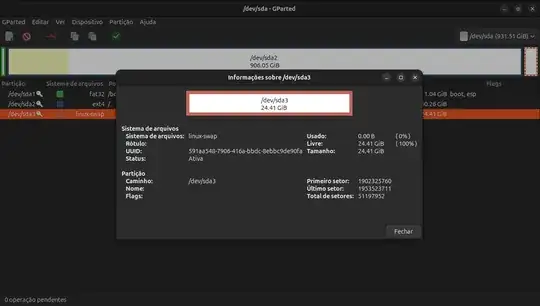
Gparted screenshot:
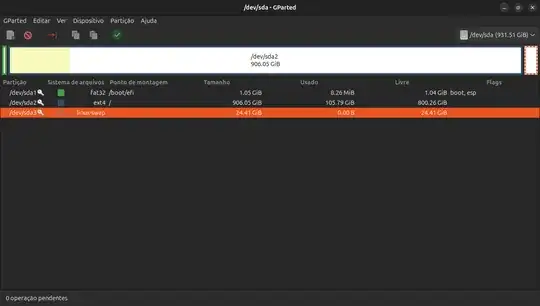
Gparted screenshot swap flag successfully added:
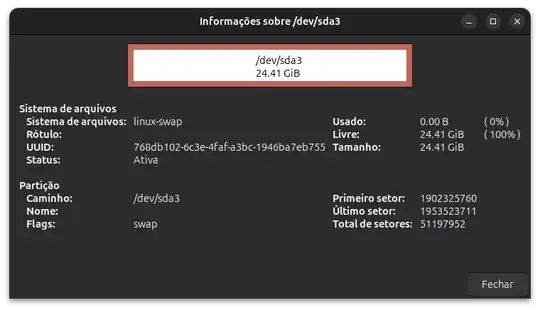
Edit4:
mokutil command:
joao@forninho:~$ mokutil --sb
SecureBoot disabled
Platform is in Setup Mode
/etc/default/grub:
joao@forninho:~$ sudo cat  /etc/default/grub
# If you change this file, run 'update-grub' afterwards to update
# /boot/grub/grub.cfg.
# For full documentation of the options in this file, see:
#   info -f grub -n 'Simple configuration'
GRUB_DEFAULT=0
GRUB_TIMEOUT_STYLE=hidden
GRUB_TIMEOUT=0
GRUB_DISTRIBUTOR=( . /etc/os-release; echo ${NAME:-Ubuntu} ) 2>/dev/null || echo Ubuntu
GRUB_CMDLINE_LINUX_DEFAULT="quiet splash resume=UUID=462fdbca-d70f-48b7-8eed-999397a42d8a"
GRUB_CMDLINE_LINUX=""
If your computer has multiple operating systems installed, then you
probably want to run os-prober. However, if your computer is a host
for guest OSes installed via LVM or raw disk devices, running
os-prober can cause damage to those guest OSes as it mounts
filesystems to look for things.
#GRUB_DISABLE_OS_PROBER=false
Uncomment to enable BadRAM filtering, modify to suit your needs
This works with Linux (no patch required) and with any kernel that obtains
the memory map information from GRUB (GNU Mach, kernel of FreeBSD ...)
#GRUB_BADRAM="0x01234567,0xfefefefe,0x89abcdef,0xefefefef"
Uncomment to disable graphical terminal
#GRUB_TERMINAL=console
The resolution used on graphical terminal
note that you can use only modes which your graphic card supports via VBE
you can see them in real GRUB with the command `vbeinfo'
#GRUB_GFXMODE=640x480
Uncomment if you don't want GRUB to pass "root=UUID=xxx" parameter to Linux
#GRUB_DISABLE_LINUX_UUID=true
Uncomment to disable generation of recovery mode menu entries
#GRUB_DISABLE_RECOVERY="true"
Uncomment to get a beep at grub start
GRUB_INIT_TUNE="480 440 1"
/etc/fstab:
joao@forninho:~$ cat /etc/fstab
# /etc/fstab: static file system information.
#
# Use 'blkid' to print the universally unique identifier for a
# device; this may be used with UUID= as a more robust way to name devices
# that works even if disks are added and removed. See fstab(5).
#
# <file system> <mount point>   <type>  <options>       <dump>  <pass>
# / was on /dev/sda2 during curtin installation
# /boot/efi was on /dev/sda1 during curtin installation
/dev/disk/by-uuid/64076d20-4fd9-4784-809e-2fca25f89b97 / ext4 defaults 0 1
/dev/disk/by-uuid/CCDC-8094 /boot/efi vfat defaults 0 1
/dev/disk/by-uuid/462fdbca-d70f-48b7-8eed-999397a42d8a none swap sw 0 0
blkid
joao@forninho:~$ blkid
/dev/sda3: UUID="462fdbca-d70f-48b7-8eed-999397a42d8a" TYPE="swap" PARTUUID="f70a1e9d-6af4-4604-8406-2a94dc2a9658"
/dev/sda2: UUID="64076d20-4fd9-4784-809e-2fca25f89b97" BLOCK_SIZE="4096" TYPE="ext4" PARTUUID="bdb38c40-2dba-4f0c-8088-32d0f4f0cbd7"

