1

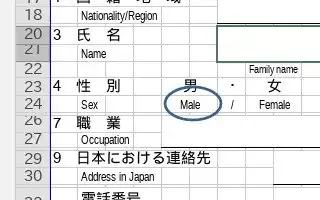
I want to add a circle around some text using Libreoffice. How do I add a shape without modifying the text?

I’ve tried to use: Insert → Shape, but seems none of the shapes can be added as part the spreadsheet is protected. I want to add the shape on some cells (protected or unprotected).

Here is the excel file I am trying to edit: https://github.com/user-attachments/files/15542625/default.xlsx. I am supposed to circle around the Male/Female options.

Any solution?


A workaround I found is to edit the excel on Windows instead. Then can draw ellipse.

Maybe the reason that the excel can't add a shape on linux is due to it's partly protected, and I don't have the password. But, on windows I can add shape.

Eric
  • 510

1 Answers1

2

While LibreOffice does not have this feature, you can use OnlyOffice (it is free and open source) instead of LibreOffice. Here is the bug report for LibreOffice.


First, download it from its official webpage.

Here is the download link for the .deb package: https://download.onlyoffice.com/install/desktop/editors/linux/onlyoffice-desktopeditors_amd64.deb

After downloading, install it with GDebi or with command line.

  1. To encircle a text, first create an oval shape with Insert -> Shapes and choose the oval shape.
  2. Encircle the text you want to highlight.
  3. Click on fill on the pane in the right side and click on "No Fill", so that only the border of the circle remains.

Results:

enter image description here


This part of the answer was written for unprotected office documents, before the question was updated for protected cells.

Here is how to do this in Libreoffice (installed from official APT repositories, not Snap Store):

Click on Insert, and click on the ellipse tool.

enter image description here

Now draw an ellipse

enter image description here

Now, the "Draw" tab would be selected (if not, click on the ellipse). Click on "Area", and select None.

enter image description here

Results:

enter image description here