Cause
As already mentioned above, GNOME has 2 ways for switching applications:
- 'Application switching' (usually mapped to Super + Tab) switches on a per-application basis, and
- 'Window switching' (usually mapped to Alt + Tab) switches on a per-window basis.
Separate settings control the behavior of Application switching and Window switching. The settings described in the question apply to Application switching only (N.B. caption is literally 'Application switching'). This setting will not change the way Window switching works.
Similar setting exists for Window switching as well, the factory default for which is "current workspace only" -- hence the experienced behavior.
Unfortunately this second setting is not shown on the GUI, therefore cannot be changed directly.
Solution
In order to enable cross-workspace Window switching with Alt+Tab, the configuration value of org.gnome.shell.window-switcher.current-workspace-only must be set to false with some other tool than Settings.
- Option 1: use the following command from a terminal:
gsettings set org.gnome.shell.window-switcher current-workspace-only false
- Option 2: use the Dconf Editor tool (install if necessary from software center or from terminal:
sudo apt install dconf-editor), then use the treebrowser in Dconf Editor to navigate to org.gnome.shell.window-switcher.current-workspace-only, turn off the switch:
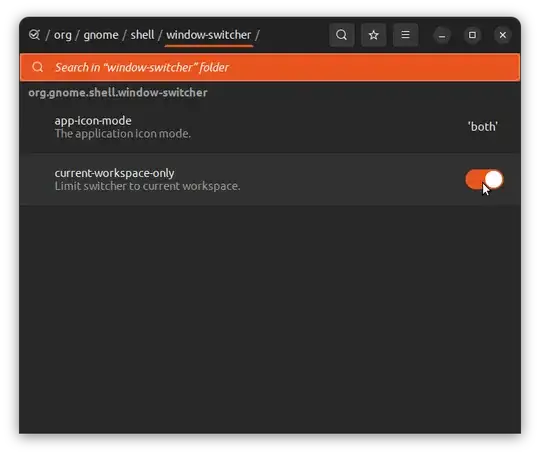
Alt + Tab will then include windows from all workspaces.
Source


