I want to use themes from Gnome Art, but I can't find where to configure Control/Window Border/Icons in Ubuntu 12.04.
Asked
Active
Viewed 4.7k times

3 Answers
4
Install gnome-tweak-tool
sudo apt-get install gnome-tweak-toolDownload the theme from Gnome-art(make sure that it is gtk3 theme)
Extract the theme and copy it to the .themes(.icons for icon themes) folder in your home folder (It is hidden by default press ctrl+h to see it
open advanced settings from unity dash
Move to 'Theme' option on the left sidebar. You can now change the Window theme,icon theme and gtk theme from there by changing the options in the dropdown list
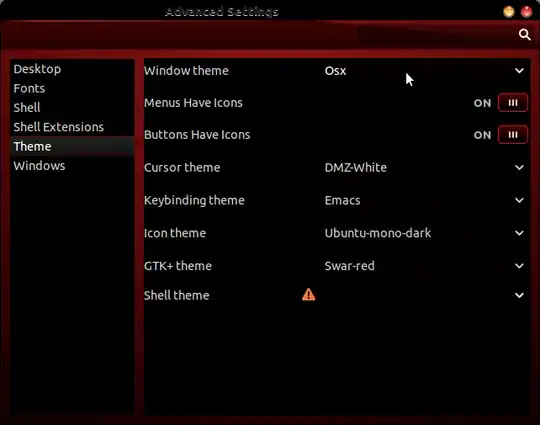


2
In Gnome2 you could further customise a theme by selecting either Controls, Colors, Window Border, Icons. Under Colors-> "Selected Items", you could change the color for "selected items". This changed the Window's border color (of the active theme).
There didn't seem to be a way to do this using gnome-tweak-tool...
UPDATE: But now there does! The response to How do I change the colors of the Ambiance & Radiance themes? explains how to use gsettings to override a theme's color setting(s).
This is what I did to change the Window border color and the Window background color:
gsettings set org.gnome.desktop.interface gtk-color-scheme selected_bg_color:#5598D7;selected_fg_color:#EDE9E3"
You can find the default settings for a theme in /gtk-3.0/gtk.css amd /gtk-3.0/settings.ini. Just look for the line that starts with gtk-color-scheme =.


Kurt Krueckeberg
- 129