0

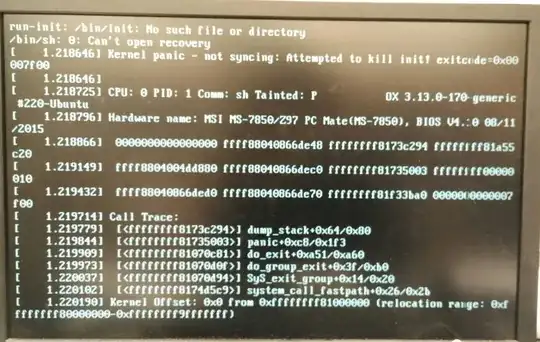
This is the image of what loads on my screen when I try I try to boot up ubuntu. I don't know how to fix this error. The Kernel is tainted, and I'm not able to fix anything at the moment because accessing any mode at all leads to this same problem. I have a live disk, but I don't know ow to fix this problem with it. I know reinstalling would be a solution but is there any way to fix this without doing that? Please help. Thanks!

This is the image of what loads on my screen when I try I try to boot up ubuntu. I don't know how to fix this error. The Kernel is tainted, and I'm not able to fix anything at the moment because accessing any mode at all leads to this same problem. I have a live disk, but I don't know ow to fix this problem with it. I know reinstalling would be a solution but is there any way to fix this without doing that? Please help. Thanks!

1 Answers1

0

Lets first check your file system for errors.

For 17.10 or older...

  • boot to the GRUB menu
  • choose Advanced Options
  • choose Recovery mode
  • choose Root access
  • at the # prompt, type sudo fsck -f /
  • repeat the fsck command if there were errors
  • type reboot

For 18.04 or newer...

  • boot to a Ubuntu Live DVD/USB
  • open a terminal window
  • type sudo fdisk -l
  • identify the /dev/XXXX device name for your "Linux Filesystem"
  • type sudo fsck -f /dev/XXXX # replacing XXXX with the number you found earlier
  • repeat the fsck command if there were errors
  • type reboot

Looks like you've got an old BIOS.

Go to https://us.msi.com/Motherboard/support/Z97-PC-Mate.html and get the newer version, install it (if you can) and see if that solves the problem.

See https://us.msi.com/files/pdf/How_to_flash_the_BIOS.doc for BIOS update instructions.

Update #1:

A Ubuntu reinstall was required to fix the problem.
heynnema
  • 73,649