1

I am running into an issue with my Dell PowerEdgee R610. I am new to the Ubuntu server world but have ran ubuntu desktop many of times.

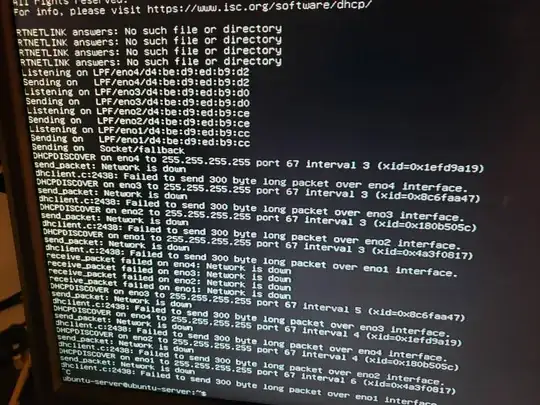
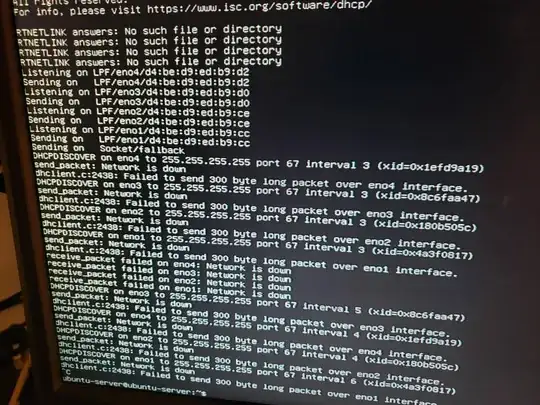
When trying to run the network configuration, DHCP is enabled on the server BIOS but for some reason is not pulling an IP address to Eno1-4.

I tried setting a static from what I have in my router for the server,

Subnet: 192.168.1.0/24
Ipv4 addr: 192.168.1.118
Gateway: 192.168.1.1
Name Server:8.8.8.8

I set static routes in my router.

Any ideas?

I also wanted to add that my LCC for the server does ping out to websites properly. It has an internet connection that can do so.

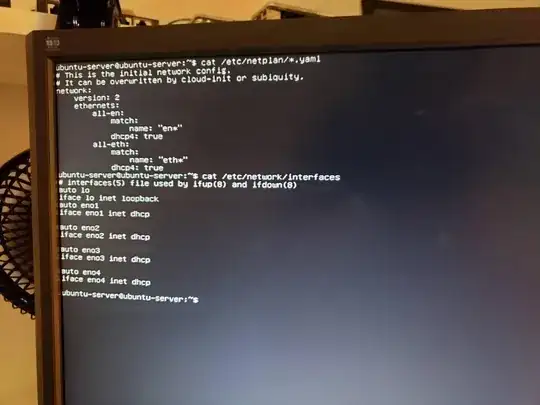
Image for troubleshooting:

https://imgur.com/a/MWKNIwJ

https://imgur.com/a/MWKNIwJ

https://imgur.com/a/gMqeVit

dhclient -v

https://imgur.com/a/2YwGqCw

They were too large to upload to the post, and i couldnt find a way to save the CLI session on the bootable drive.

Neman
  • 11

3 Answers3

0

Dell PowerEdgee R610 may require additional, custom firmware. The installation should complain about the missing firmware with relevant messages, that may tell you what you're looking for.

If such messages does not show up, then you may want to try to use lshw to find your service tag.

sudo lshw | less

You should see something like:

product: PowerEdge R610
    vendor: Dell Inc.
    serial: XXXXXXX

Your serial will be there. You can copy it and paste at https://www.dell.com/support/ to find proper drivers.

You will not find Ubuntu drivers on Dell site probably, but you're looking for .bin files reated to Network devies.

Comar
  • 1,525
0

In Ubuntu 18.04 and later, ifup/down, implemented by /etc/network/interfaces, is replaced by netplan. Therefore, please revert the faulty entries. From the terminal:

sudo nano /etc/network/interfaces

Take out all the entries except:

auto lo
iface lo inet loopback

Save (Ctrl+o followed by Enter) and exit (Ctrl+x) the text editor.

Next, let's clean up your netplan file:

sudo nano /etc/netplan/01-netcfg.yaml

Change the file to read:

network:
  version: 2
  renderer: networkd
  ethernets:
    eno1:
      dhcp4: true

Netplan is very specific about indentation and spacing. Please proofread carefully twice. Follow with:

sudo netplan generate
sudo netplan apply

After these changes, reboot and let us see:

sudo dhclient -v

We hope will find out which interface has the ethernet cable attached and then amend the yaml file accordingly if it isn't eno1.

chili555
  • 61,330
0

I have the same problem like you. After boot I type dmesg | grep bnx2

bnx2: Can't load firmware file "bnx2/bnx2-mips-09-6.2.1b.fw"

I find an answer in Broadcom NetXtreme II BCM5716 Ethernet controller unclaimed after update to 16.04 server

Download the firmware and copy to my server, and modprobe bnx2

ppppdm
  • 1